Find what isn’t mapped yet
What you’ll do
You check how much of the template your mappings cover, and how much of each FHIR profile they fill in. The Template tab of the openEHR pane walks the template’s tree; the Profile tab of the FHIR pane lists each profile’s elements. Both mark what is mapped, what is required and still open, and add a mapping for an open element in one click.
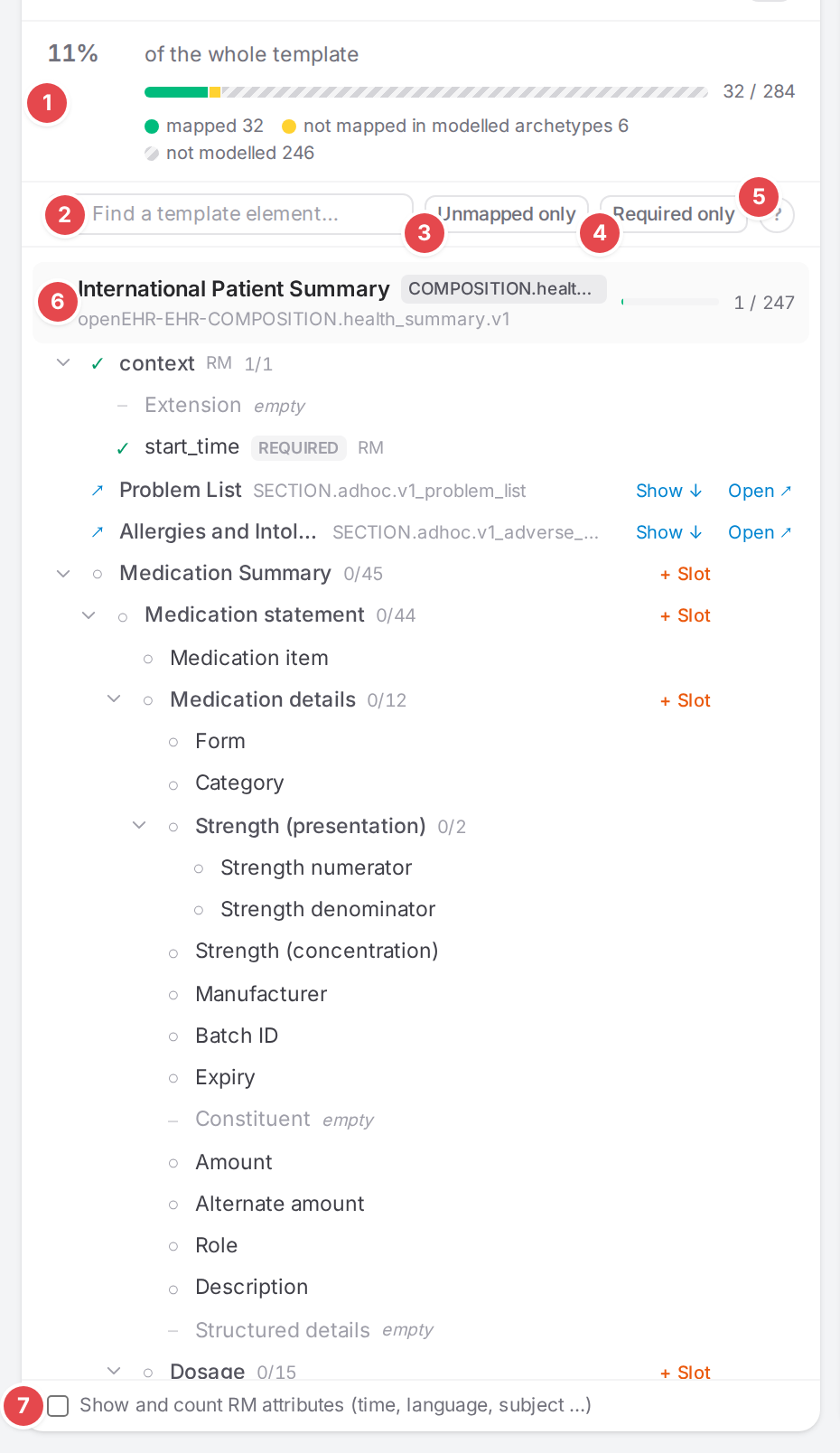
The Template tab of the demo template “International Patient Summary”.
Before you start
Open a template in the Workspace. Coverage needs no open model; with one open, it also shows that model’s share.
Coverage counts the mappings as saved: it reads the engine’s resolved mapping tree. Save your edits to see them counted.
For the Profile tab to show your profile’s required and must-support elements, the IG package that defines the profile must be loaded (Use FHIR profiles and IG packages).
Steps
1. Open the Template tab
Click Template in the openEHR pane, or the percentage in the top bar (it shows the open model’s share, else the whole template’s, and opens the Template tab). Atlas remembers in this browser which tab each pane showed.
The Template tab label carries the percentage too, green from 80 % up, amber below; a red dot means required elements nothing maps. Hover it for “N of M elements mapped”.
- 1 The whole template
11%“of the whole template”, a bar split into mapped, not mapped in modelled archetypes and not modelled (hatched), the count32 / 284, andN requiredwhen required elements are open.- 2 Find a template element…
Searches names and flat paths. Matches show with their parents, and the units open.
- 3 Unmapped only
Only what nothing maps yet.
- 4 Required only
Only elements that must be present (min ≥ 1). The two filters are shared with the Profile tab.
- 5 Legend
Hover or focus the ?. Its link How coverage is counted opens this page.
- 6 A unit
One archetype occurrence a model maps (the first unit is the template’s root). It shows the occurrence’s name, the models that map it (the open model in orange, extensions as
ext · <name>), the archetype id, a bar withmapped / totalandN required. A unit without a model offers + model. Click the header to open or close it. When an archetype occurs several times (like the IPS sections), “· in” tells the occurrences apart. - 7 Show and count RM attributes (time, language, subject …)
Shows the reference-model attributes in the tree and counts them. Kept for this browser session.
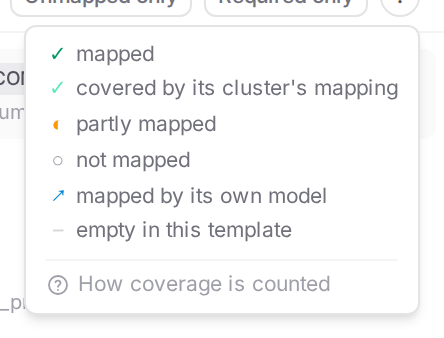
The legend.
Mark |
Meaning |
|---|---|
✓ (green) |
mapped: a mapping lands on it. |
✓ (light green) |
covered by its cluster’s mapping: a mapping of the whole enclosing cluster covers it. |
◐ |
partly mapped: some of the elements below it are mapped. |
○ |
not mapped |
↗ |
mapped by its own model: an archetype occurrence another model maps; its elements count there. |
– |
empty in this template: the template constrains nothing inside, so there is nothing to map. |
A row also shows required (red while not mapped, grey once mapped), RM for a reference-model
attribute, the data value types, ext · <extension> when an extension model maps it, and
mapped / total for a container. A dashed amber not linked · <model> means a model for that
archetype exists, but nothing slots it in, so the engine never runs it (see
Connect models: slots, links, references).
2. Act on a row
Hover a row for its actions.
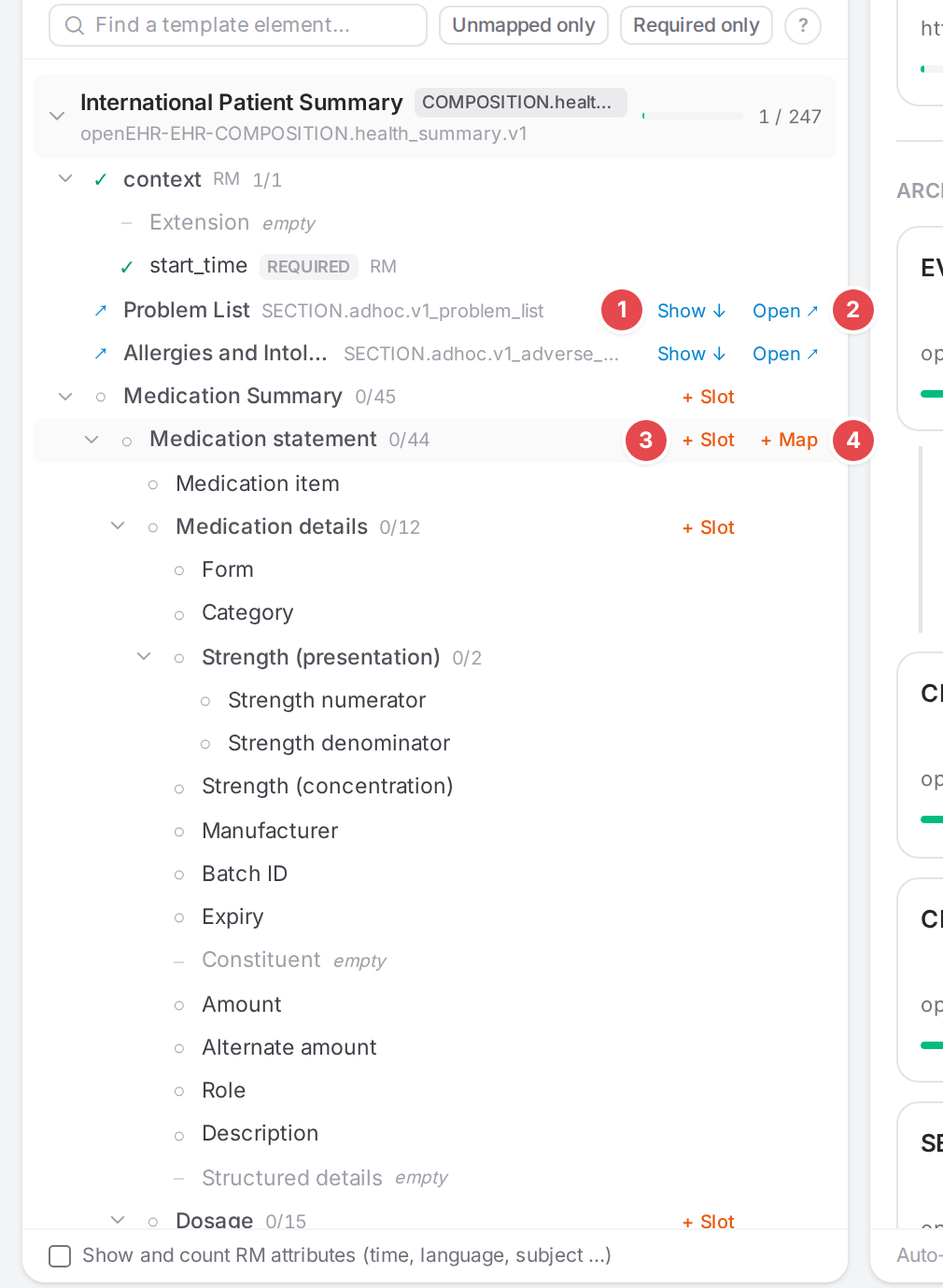
The actions on the rows of the IPS template’s root unit.
- 1 Show ↓
On an archetype another model maps (↗): scrolls to that model’s unit.
- 2 Open ↗
Opens that model. On a
not linkedoccurrence it opens the unlinked model.- 3 + Slot
On an archetype occurrence: plugs a model into it from the enclosing unit’s model, the same way NOT YET MAPPED adds one, with this occurrence chosen. When models of the archetype exist, Use an existing mapping? lists this template’s first, then other templates’ (picking one of those adds it to the context), with New model…; when none exists, you name a new model and the wizard creates it. Both ask under FHIR resource whether the model enters a resource of its own, then a slot mapping (or, for another resource, the reference + slot structure) is added to the enclosing model. Disabled when the enclosing unit has no model: “
has no model to hold the slot — create one first”. Not offered when the enclosing model already maps elements inside the occurrence: a model slotted in would map them twice, so use Go to mapping on those elements instead. A mapping that only leads into a slot there (a reference + slot) doesn’t count. See Connect models: slots, links, references. - 4 + Map
On an element nothing (or not everything) maps: adds a mapping for it to the unit’s model (the open one when it maps this unit). The new mapping is named after the element, its openEHR path is filled in, and the cursor waits in the FHIR path. In an extension model it gets
extension: add.
Other actions:
- Go to mapping
On a mapped row: selects the mapping that maps it,
(+N)when more than one does (hover to list them). Clicking the row itself does the same.- + model
Where no enclosing model could hold a slot and nothing maps inside the occurrence: starts a model for that archetype.
- EDITING
Marks the element the selected mapping lands on. The tree scrolls to it when you select another mapping.
The new mappings are edits of the open model like any other: they stay unsaved until the model is saved.
3. See the open model’s share
With a model open, the top of the tab shows that model’s coverage, and its units open.
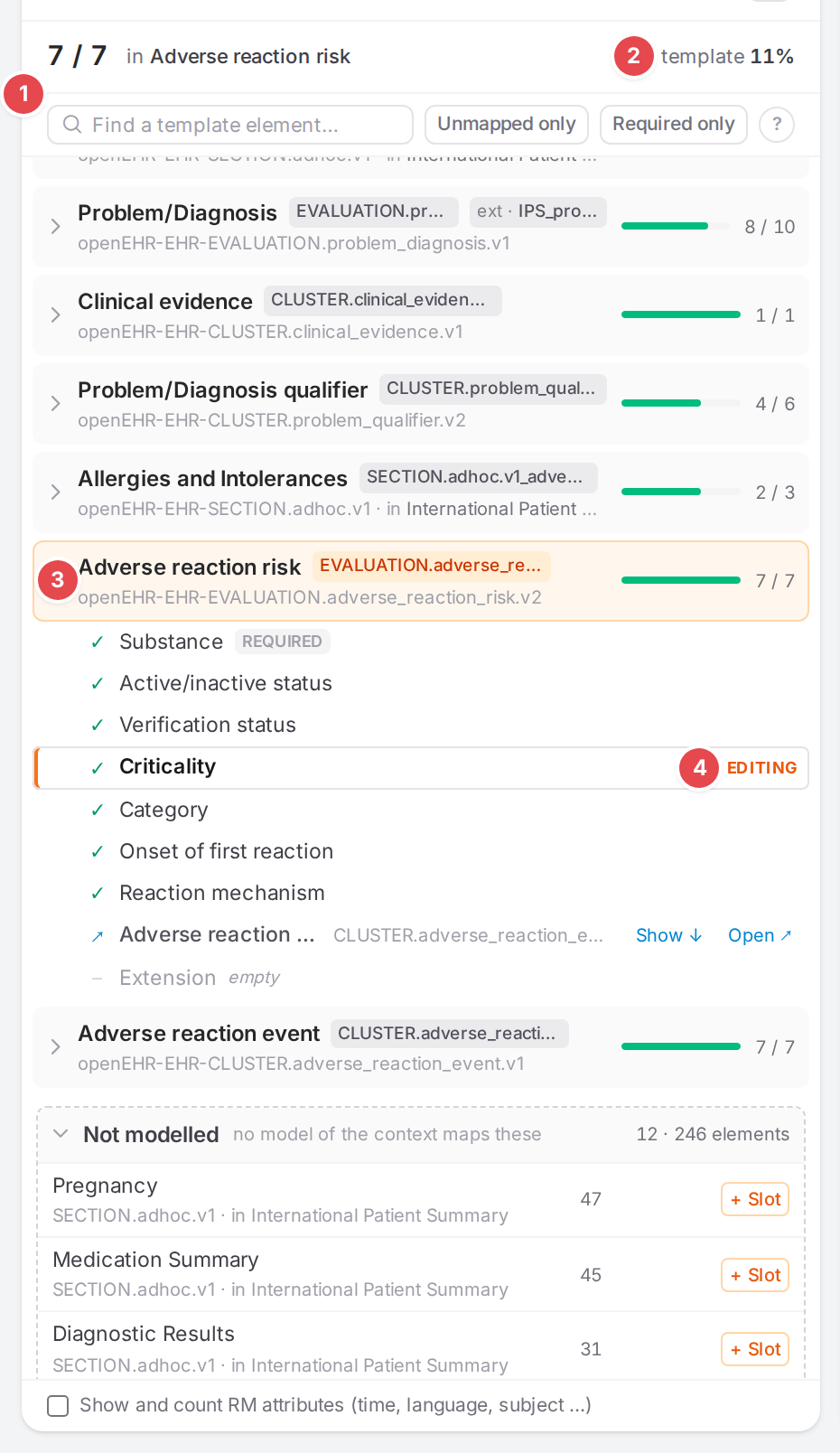
The allergy model maps all 7 elements of its archetype.
1 7 / 7 “in Adverse reaction risk”: mapped / total in the model’s units (+N when it
maps more than one), with N required when required elements are open.
2 “template 11%”: the whole template, for comparison.
3 The open model’s unit, tinted orange. The tree never reorders: units stay in template order whichever model is open.
4 EDITING: the element of the selected mapping.
4. Check the Not modelled list
Under the units, Not modelled (“no model of the context maps these”) lists the archetype occurrences no model maps, largest first, with how many elements each holds. Click a name to show it in the tree; + Slot or + model start mapping it. Their elements count in the whole template, so they keep its percentage down until something maps them.
5. Open the Profile tab
Click Profile in the FHIR pane. It lists one entry per profile the template’s models produce, with its elements and whether the mappings produce them. Its tab label carries the percentage of required and must-support elements mapped.
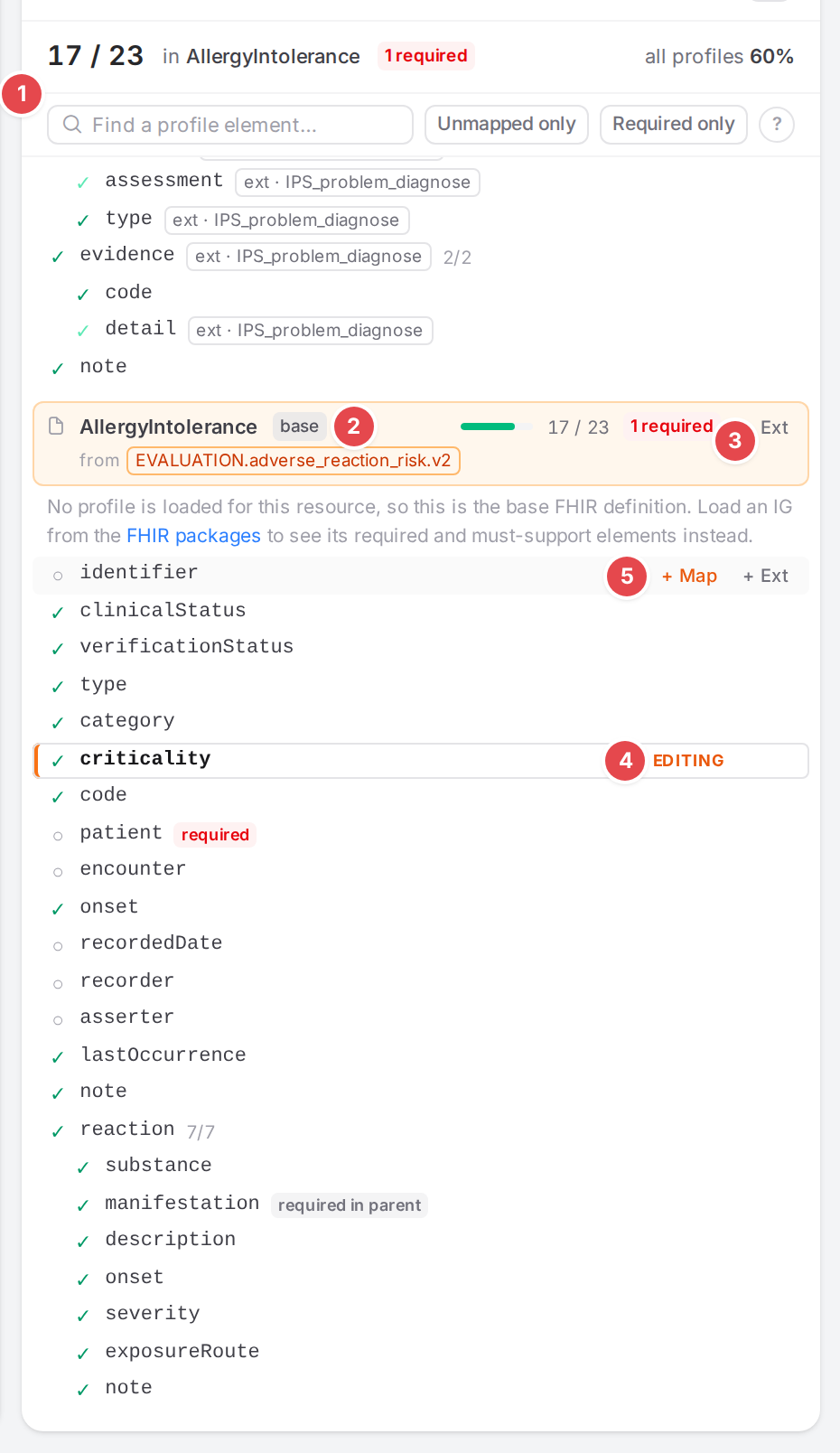
The AllergyIntolerance entry of the allergy model. No IG package is loaded, so it is the base definition.
- 1 The open model’s share
17 / 23“in AllergyIntolerance”,N required, and “all profiles P%” on the right. Without an open model:P%“of all profiles” with mapped and not mapped.- 2 base
No loaded profile: the resource’s core definition, with all of its elements. The text below it says: “No profile is loaded for this resource, so this is the base FHIR definition. Load an IG from the FHIR packages to see its required and must-support elements instead.”
- 3 + Ext
Adds an extension to the resource itself. On a row, + Ext adds one under that element. See Add a FHIR extension.
- 4 EDITING
The element the selected mapping produces.
- 5 + Map
On an element nothing produces: adds a mapping that writes it, with its slice condition when it is a slice, and puts the cursor in the openEHR path.
+ Map …means several models produce this profile: pick one under Map in.
The entry header also says which models produce the profile (from <model>, + ext · <name>
for extensions merged into it, · not linked for a model nothing slots in). A row shows:
the mark: ✓ mapped, light ✓ filled in by a parent element’s mapping, ○ not mapped, and a light ○ for an optional element nothing maps (listed, not counted);
required: min ≥ 1 whenever the resource is produced (min ≥ 1 on every level up);required in parent: min ≥ 1, but only when its parent element is present;MS: must support;added: an extension the profile doesn’t define (see Add a FHIR extension);the types and cardinality, and
mapped/totalof the counted elements below it;k of nwhen several models produce the profile and onlykof them produce this element;Go to mapping on a produced element.
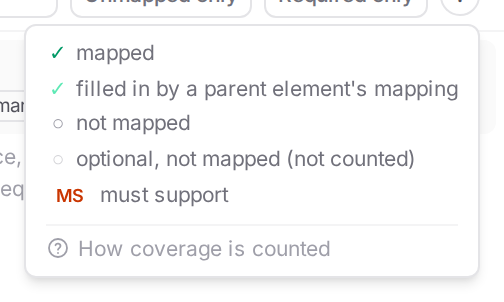
The legend of the Profile tab.
If the template’s models name no FHIR resource or profile, the tab says “No model of this template names a FHIR resource or profile.” A profile whose package isn’t loaded and that has no core to fall back on says “The profile isn’t loaded.”
6. Compare with a version
When the mappings are versioned in Git (Ship: versions, reviews, releases), the Template tab has Compare with… next to the filters. You won’t see it when the engine doesn’t version the mappings, no Git remote is configured, or you’re on the public demo.
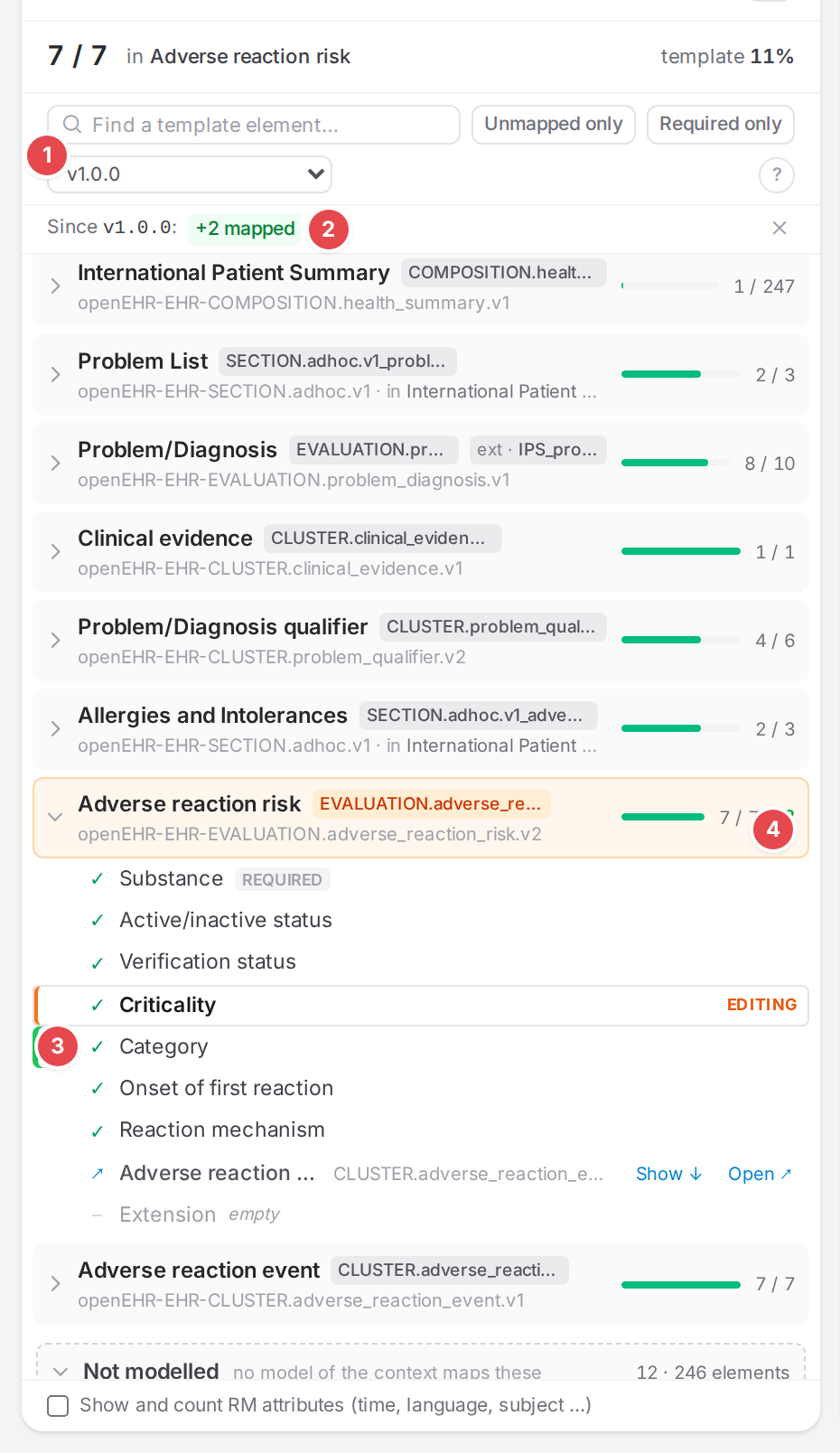
Two allergy elements were mapped since release v1.0.0.
- 1 Compare with…
Lists the Releases and the last 20 Commits (“Loading versions…” the first time you open it).
- 2 Since
<version> What changed:
+N mapped,−N lost,required unmapped a → b,not modelled a → b,N template nodes added/removed, or “no coverage changes”. The × stops comparing.- 3 A changed element
A bar on the left: green newly mapped, red no longer mapped, blue changed status, grey added to or removed from the template.
- 4 Unit change
+N/−Nnext to the unit’s bar.
Opening another template stops the comparison. Comparing two versions in full is described in Compare two versions.
How coverage is counted
Template tab
What counts. Each element (
ELEMENT) and each data value (DV_…,CODE_PHRASE) that has nothing below it in the template. Archetype roots, clusters and other containers aren’t counted themselves; they show the sum of what is below them. Reference-model attributes (time, language, subject …) count only with Show and count RM attributes, or when a mapping maps one.Mapped. A mapping’s openEHR path, as the engine resolved it at the last save, lands on the element or below it (
…/value,|code). A mapping without child mappings that lands exactly on a cluster covers every element inside the cluster (light ✓). A manual entry that only writes a FHIR constant reads nothing from openEHR, so it doesn’t count.Partly mapped. A container with some, not all, of its elements mapped.
Required. An element with min ≥ 1 on every level up to its unit’s root: it must be present whenever that archetype is.
Units. The template’s root and every archetype occurrence a model maps. A unit’s elements count for its model (and the extension models of that model). An archetype inside another unit that has a model of its own shows as ↗ there and counts only for its own model.
Not modelled. Archetype occurrences no model maps. Their elements still count in the whole template.
Percentages. Mapped elements divided by counted elements, rounded: for the open model over its units, for the whole template over all of them.
Profile tab
Which profiles. For each model, its profile: the model’s
structureDefinitionwhen it isn’t a core FHIR definition, else the profile its mappings write intometa.profile. Models of the same profile share one entry. When the profile isn’t loaded, the resource’s core definition stands in (base).Which elements are listed. All elements of the profile you can map, except the ones every resource inherits (
id,meta,text, an unslicedextension…) unless the profile makes them required or must-support, and except prohibited ones (max 0).Which elements count. Required (min ≥ 1) and must-support elements. In a base definition, every listed element counts. Optional elements are listed so you see what you could map, but they don’t count.
Produced. A mapping’s resolved FHIR element is the element or one below it. A mapping of a parent element (a whole
CodeableConcept, say) fills in the elements below it (light ✓). An element inside a slice counts only when the mapping selects that slice. An element counts for the model whose resource it lands in, so a slotted cluster model that writes into its parent’s resource counts there.Extensions. What an extension model adds counts for the model it extends. Extensions you add with + Ext are listed but never counted.
Percentages. Mapped counted elements divided by counted elements, over the open model’s profiles, or over all loaded profiles.
Tips
Tip
Start with Required only and Unmapped only together: what is left is what a valid output can’t do without.
Tip
+ Map and + Slot only edit the model. Fill in the other path, save, and the element turns green.
Watch out
Warning
“Required in parent” isn’t “required”. A required in parent element must be present only when its
parent element is. A plain required one must be present whenever the resource is produced.
Warning
Optional FHIR elements are listed but not counted. A high profile percentage says the required and must-support elements are covered, not that every element is.
Warning
Extensions you add with + Ext are drafts kept for this browser session only, until a mapping produces them. Close the session before you map them and they are gone.
Warning
Coverage reflects the last save. A mapping you just added shows as not mapped until the model is saved.
If something goes wrong
“The template’s tree couldn’t be read.” The template’s node tree came back empty. Reopen the template; if it stays, the OPT may be damaged (Bring your material in).
“Nothing matches the search.” / “Nothing matches the filters.” Clear the search or a filter.
“Could not read the template as of
”: the comparison failed; pick the version again. A + Slot that fails says why in the dialog, for example “Failed to reference model”; nothing is added.
not linked · <model>: Not linked · nothing slots it in from the start, so it never runs.