Connect a Git repository
What you’ll do
You connect the engine to a Git repository you own, so every recorded change to the mappings can be pushed there as commits. You choose how changes reach the branch (pushed directly or through pull requests), whether pushes happen on their own, and you make the first connection.
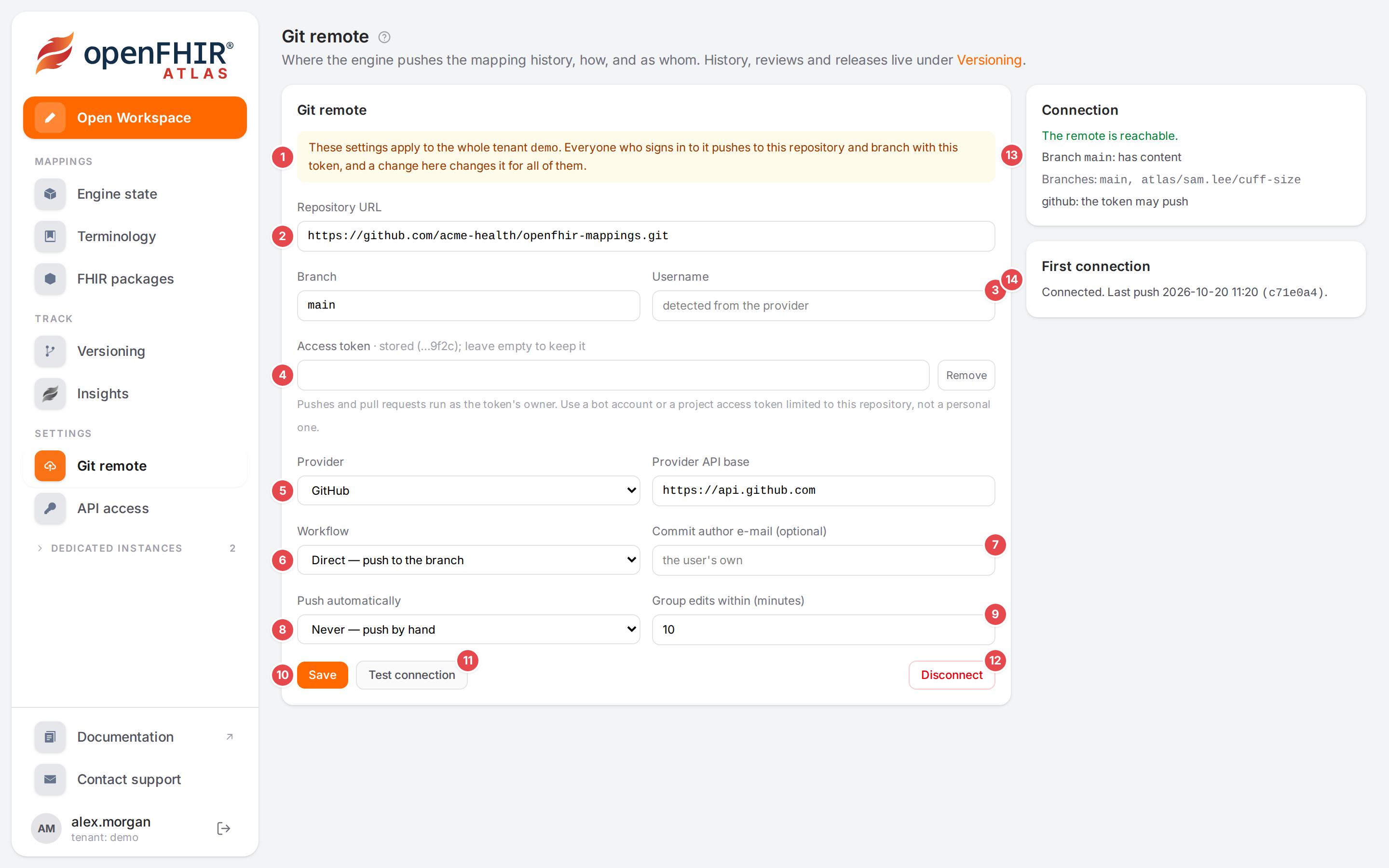
The Git remote page of a connected tenant, after Test connection.
Before you start
Versioning must be available: see When is versioning available.
You need an empty or existing repository on GitHub, GitLab, Gitea / Forgejo or any Git server reachable over https, and an access token that may push to it.
Changing the settings needs the
versioning.wscope.
Warning
The settings belong to the whole tenant. The page says so: These settings apply to the whole tenant … Everyone who signs in to it pushes to this repository and branch with this token, and a change here changes it for all of them. Agree on the settings with your team before you change them.
Steps
In the sidebar, under Settings, click Git remote. (From the Versioning page, the link Git remote settings leads here too.)
Fill in the form. The numbers match the screenshot above.
Field
What to enter
1
Tenant notice
Who these settings apply to: everyone of your tenant.
2
Repository URL
The https URL of the repository, for example
https://github.com/acme/mappings.git. Save stays disabled until it is filled in.Branch
The branch the engine pushes to. Empty means
main.3
Username
Only if your Git server needs a user name with the token. GitHub and GitLab don’t; the placeholder says detected from the provider.
4
Access token
The token pushes and pull requests run as. Once stored, the label shows stored (…hint); leave empty to keep it: an empty field keeps the stored token, a typed one replaces it, and Remove deletes it. The token stays with the hosts it was given for: see changing the repository.
5
Provider
Detect from the URL (default), GitHub, GitLab, Gitea / Forgejo or Plain git (no pull requests). Reviews and provider releases need a provider.
Provider API base
The API address of your provider. Leave it empty and the engine detects it from the URL (
https://api.github.comfor github.com). Enter it for GitHub Enterprise or a self-hosted GitLab or Gitea.6
Workflow
Direct — push to the branch, or Review — changes go through pull requests (not available with Plain git). See Submit for review.
7
Commit author e-mail (optional)
Empty: each commit carries the e-mail of the user who made the change. Filled in: Used for every user’s commits.
8
Push automatically
Never — push by hand, After a change — once edits pause, or On an interval — every N min with changes. With the review workflow the field reads Off with the review workflow: changes reach the branch only as pull requests.
9
Group edits within (minutes)
Changes by the same person within this many minutes become one commit. With On an interval it is also the push interval.
The engine detects the provider and the API base again whenever the repository URL changes, unless you change them yourself in the same save.
Click Save 10. Saved. appears under the form.
Click Test connection 11. The Connection card 13 says whether the remote is reachable, whether the branch exists and has content, lists the branches, and whether the token may push.
Make the first connection in the First connection card 14: click Connect. It pushes the engine’s current state as the first commit of the branch. If the branch already has content, continue with the first connection.
When the branch already has content
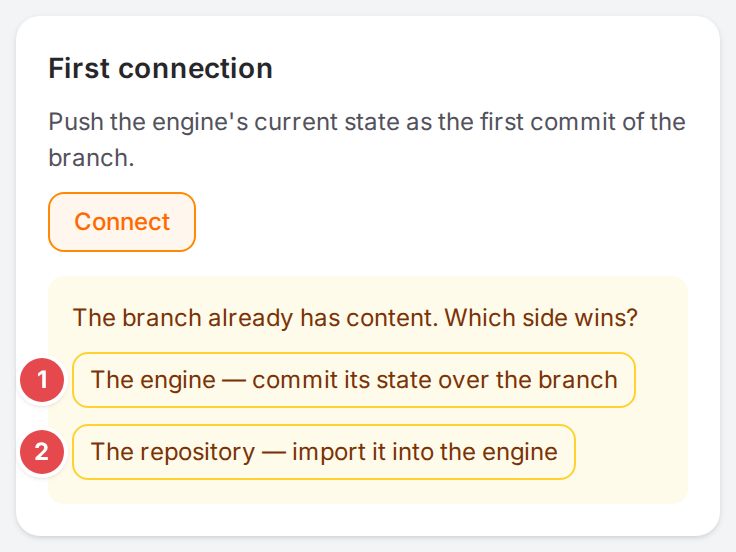
The repository already holds mappings: choose which side wins.
Atlas asks The branch already has content. Which side wins?
The engine — commit its state over the branch 1: the engine’s mappings are committed on top of the branch. Files that aren’t mappings (a README, CI settings) stay.
The repository — import it into the engine 2: the engine imports the repository straight away and becomes its copy. Errors in the repository (a model referencing one it doesn’t contain, say) don’t stop it: the engine imports everything it can store. A file it can’t store at all is left out.
Afterwards the card reads Connected. Last push … with the date and the commit.
Move to another repository host
The stored token stays with the hosts it was given for: the repository’s host, and the provider API base’s when that is on a host of its own. Saving removes it, unless you type a new token, when the save would send it somewhere else:
the Repository URL moves to another host;
the Provider API base moves to a host that is neither the repository’s nor the provider’s default API (
api.github.comfor github.com);the first repository is set for a token stored before any.
While you edit, an amber note under the token says so: The stored token was given for <old host>. Changing the host removes it; enter a token for <new host>. (for a token stored before any repository: The stored token was given before any repository was set. Saving one removes it; enter a token for <host>.). Type the new host’s token, and the note goes away.
You can still save without one, and add the token in a second step: Atlas then says Saved. The token was removed because the host changed. Another repository on the same host keeps the token, and so does turning on a provider whose API is on the repository’s host (or is github.com’s), or clearing the Provider API base.
When the branch was deleted
A push only adds the unpushed changes, so on an empty branch it would leave out the rest of the engine’s state. When the branch was deleted after the engine pushed to it, Push asks you to connect instead, and the First connection card says The engine pushed before, but main has no commits now (deleted?). above Connect. Click Connect: it writes the engine’s whole state as the branch’s first commit again. Then push as usual.
Disconnect
Disconnect 12 removes the settings and the stored token, after you confirm:
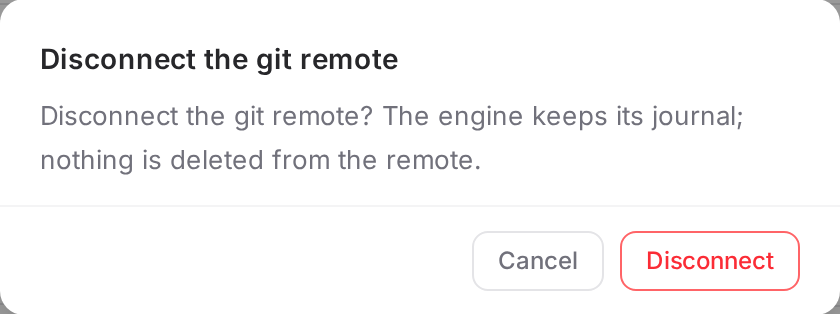
Disconnecting asks first.
The engine keeps its record of changes and nothing is deleted from the repository.
Check it worked
The Connection card says The remote is reachable. and the token may push.
The First connection card says Connected. Last push ….
On the Versioning page, the Remote tab lists the commit, and the badge says Up to date (or N unpushed once someone saves again).
Tips
Tip
Use a bot account or a project access token limited to this one repository, as the hint under the token says. Pushes and pull requests run as the token’s owner, so a personal token would make every teammate’s change look like yours on the provider. The commits themselves still name the person who made each change.
Tip
After a change keeps the remote up to date without anyone thinking about it. Pick Never if you prefer to name your changes with a checkpoint before they are pushed (see History, blame and restoring).
Watch out
Warning
Choosing The repository — import it into the engine makes the engine match the repository at once, without a preview: mappings the repository doesn’t have are deleted from the engine. Choose it only when the repository holds what the engine should.
Warning
Test connection checks the saved settings. Save first; the button stays disabled until a remote is saved.
If something goes wrong
Message |
What to do |
|---|---|
The engine has no secret key configured ( |
The engine can’t keep tokens. Whoever runs the engine must set that property. |
No API base URL is stored for <provider>, so reviews and releases can’t reach it. Save to use the default, or enter the URL of your own server. |
Click Save, or fill in Provider API base for a self-hosted server. |
A red Connection card with the reason, or The remote is not reachable. |
Check the URL and the token, and that the engine can reach the Git server. |
<provider>: the token may not push |
Give the token write access to the repository. |
The engine changed since the preview. Review the new plan. |
Someone changed the mappings while you read the plan. Read the new plan and import again. |
Saved. The token was removed because the host changed. |
Enter the token for the new host and save again (see changing the repository). |
Another versioning operation is running. Try again in a moment. |
Someone is pushing, pulling or restoring right now; the form keeps what you typed. Save or disconnect again in a moment. |
Could not save the settings, Could not connect, or the engine’s own explanation |