Access and permissions
Who sees what in Atlas, and why an item can be missing for you while a colleague has it.
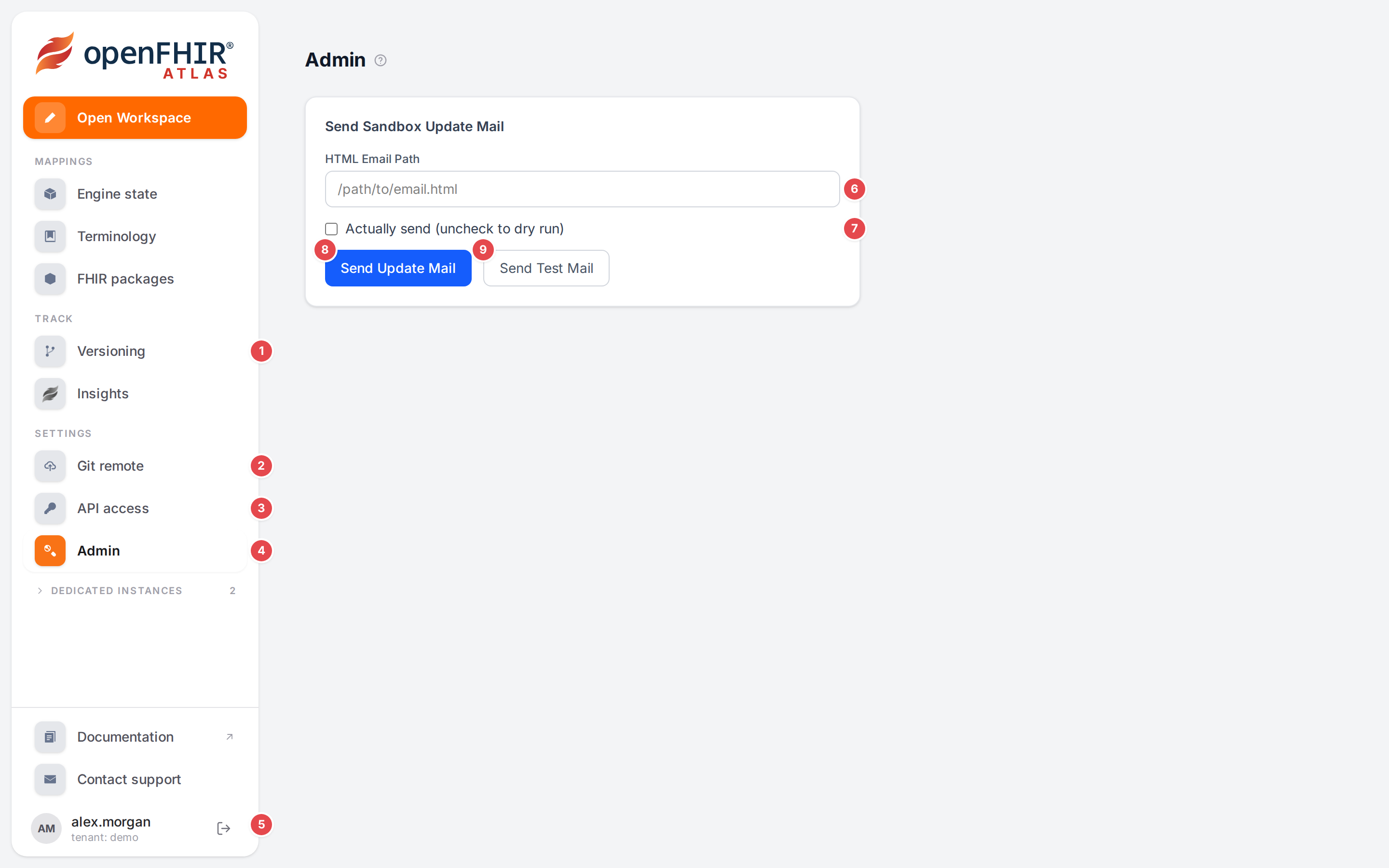
The sidebar of an admin on an engine with versioning, and the Admin page.
What it is |
|
|---|---|
1 Versioning |
Listed only when versioning is available to you (see below). Its count is the number of open reviews. |
2 Git remote |
Listed with Versioning. Its settings apply to the whole tenant. |
3 API access |
Everyone signed in. API clients of your tenant. |
4 Admin |
Only for admins. |
5 You |
Your user name, |
6–9 |
The Admin page: HTML Email Path, Actually send (uncheck to dry run), Send Update Mail, Send Test Mail (see below). |
Signed in, and your tenant
You sign in with your openFHIR account; Login sends you to the sign-in page. Your account belongs to one tenant, shown under your name in the sidebar. Everything Atlas shows and changes is your tenant’s: templates, model and context mappers, ConceptMaps, FHIR packages, insights, API clients and the versioning settings. Other tenants on the same engine never see them, and you never see theirs.
Atlas acts on the engine as you: it passes your sign-in to the engine with every request. What the engine lets your account do (its scopes) is therefore what you can do in Atlas. When the engine refuses something, Atlas shows the engine’s message.
Sign out (the arrow next to your name) ends your Atlas session and your sign-in.
Demo user
When you aren’t signed in, the sidebar footer reads:
You’re exploring openFHIR Atlas as a demo user. Sign up for individual access to unlock additional features.
with Login and, where sign-up is offered, Sign up. Signing up gives you your own account and tenant on that environment; see Ways to use openFHIR and Atlas.
The public demo
The public demo is an Atlas run in public mode. In this mode Atlas doesn’t pass anyone’s sign-in to the engine: it calls the engine with one service account of its own. As a result:
Everyone using the demo works on the same engine state, as the same engine user. Don’t put anything private in it.
Versioning and Git remote are not listed. Pages that need versioning say “Versioning is not available in the public demo.” The engine’s history would credit every change to the service account instead of to the person who made it, so Atlas turns versioning off rather than record wrong authors.
There is no Admin page.
For your own isolated workspace, use the sandbox or a licensed installation (Ways to use openFHIR and Atlas).
Admin
Admin appears under Settings only for users with the admin role in the openFHIR sign-in
service (Keycloak). Anyone else who opens /admin lands on Engine state.
The Admin page has one tool, Send Sandbox Update Mail, for the people who run the openFHIR sandbox:
Control |
What it does |
|---|---|
HTML Email Path |
A path to an HTML file on the Atlas server with the mail’s content. |
Actually send (uncheck to dry run) |
Off: Send Update Mail only lists who would get the mail (“Would send mail to (user: |
Send Update Mail |
Mails every enabled sandbox API client whose name is an e-mail address and that belongs to a tenant (“Sent mail to (user: |
Send Test Mail |
Sends the mail once to the maintainers’ fixed test address, whatever the checkbox says, and answers “Sent”. |
If the file can’t be read, the list ends with “EXCEPTION” and the reason.
Versioning: who can read and who can write
Versioning (history, blame, reviews, releases, the Git remote) is offered when all of these hold:
Situation |
What you see instead |
|---|---|
The engine versions mappings. |
“This openFHIR engine does not version mappings. Git versioning needs openFHIR Enterprise.” |
Your account may read the history: the engine scope |
“Your account may not read the version history (scope versioning.r).” |
Atlas isn’t the public demo. |
“Versioning is not available in the public demo.” |
The engine can be reached. |
“The openFHIR engine could not be reached.” |
When one of these doesn’t hold, Versioning and Git remote are missing from the sidebar, and the History tab of the Workspace’s dock isn’t there. Ship: versions, reviews, releases explains each case.
Reading needs versioning.r. Changing anything (the Git remote settings, connecting, pushing,
checkpoints, reviews and releases) needs versioning.w. Restoring a version or pulling also changes the
mappings themselves, so it needs the engine’s fc, opt and conceptmap write scopes as well. The full
list is in Authentication.
API clients
API access lists the API clients of your tenant (“No API clients found for your tenant.” when there are none). Generate Client creates one named after your user. A client signs in on its own with the client-credentials flow (Get Token), so your systems can call the engine without a person.
A generated client gets these scopes:
Scope |
Lets the client |
|---|---|
|
Convert: |
|
Read mapping insights. |
|
Create, read, update and delete model and context mappers. |
|
Create, read, update and delete operational templates. |
|
Create, read, update and delete ConceptMaps. |
It doesn’t get the FHIR package (fhirpackage.*) or versioning (versioning.*) scopes. The client
works only on your tenant’s data, like you. Delete removes it (after a confirmation). Connect your system to the API walks through it; the engine’s REST API is described in
RESTful APIs.
Warning
Treat a client secret like a password: anyone holding it can change your tenant’s mappings. Copy Secret puts it on your clipboard; don’t paste it into tickets or chat.