Add a FHIR extension
What you’ll do
You map an openEHR element to a FHIR extension the profile doesn’t define, for example the
allergyintolerance-assertedDate extension on an AllergyIntolerance. You pick the extension in the
Profile tab, and + Map writes a mapping that works both ways: it reads the extension by its
url, maps its value, and writes the url back when FHIR is built.
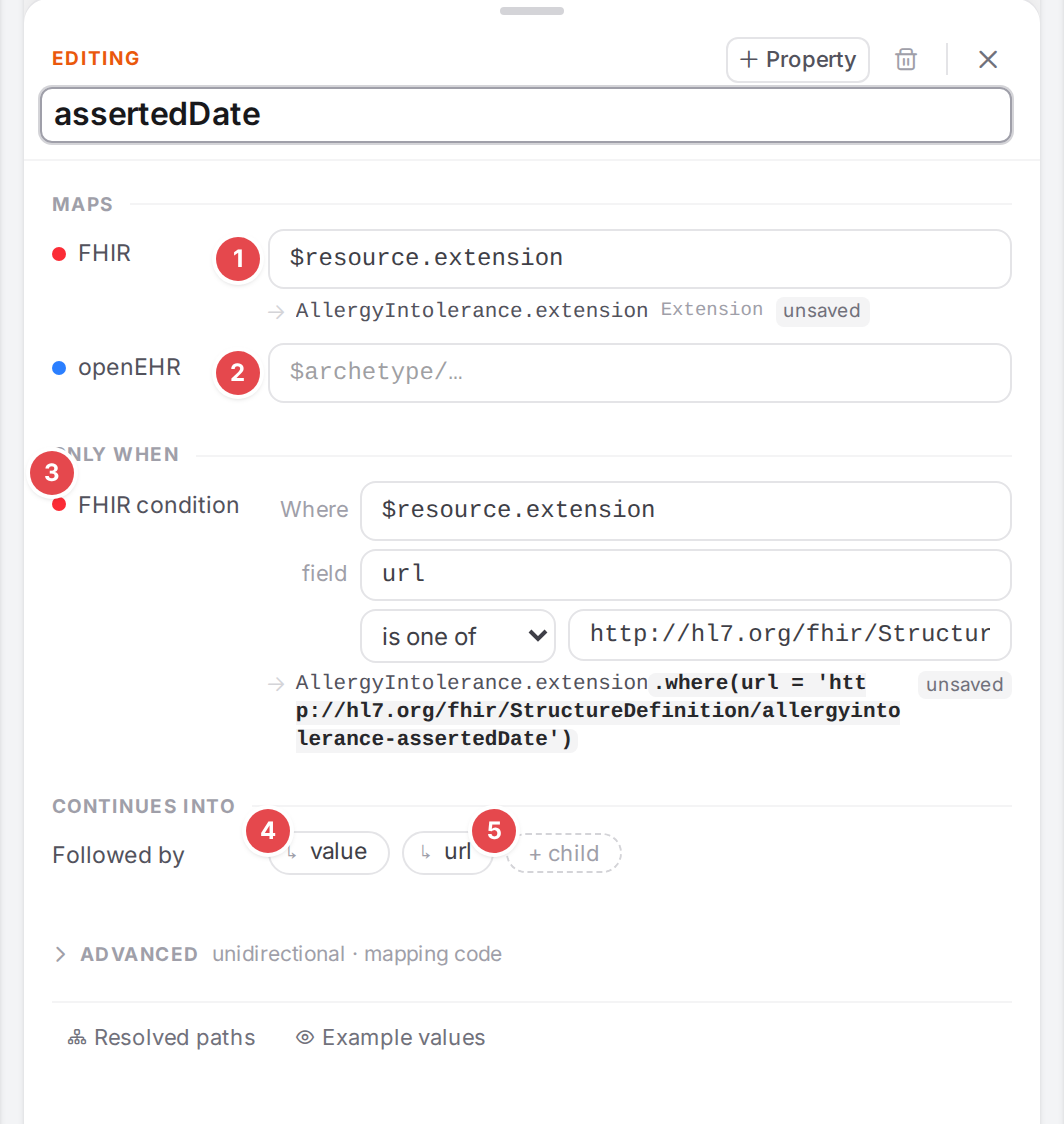
The mapping + Map writes for the asserted date extension.
Before you start
Open the model in the Workspace and click Profile in the FHIR pane (Find what isn’t mapped yet).
Extensions from IG packages are offered only when the package is loaded (Use FHIR profiles and IG packages). The core FHIR extensions are always offered.
Know where the value comes from in the template: the openEHR path you will map it from.
Steps
1. Open the extension picker
In the profile’s entry, click + Ext in its header for an extension on the resource itself, or hover an element and click its + Ext for an extension on that element. The picker opens under it, with the cursor in the search.
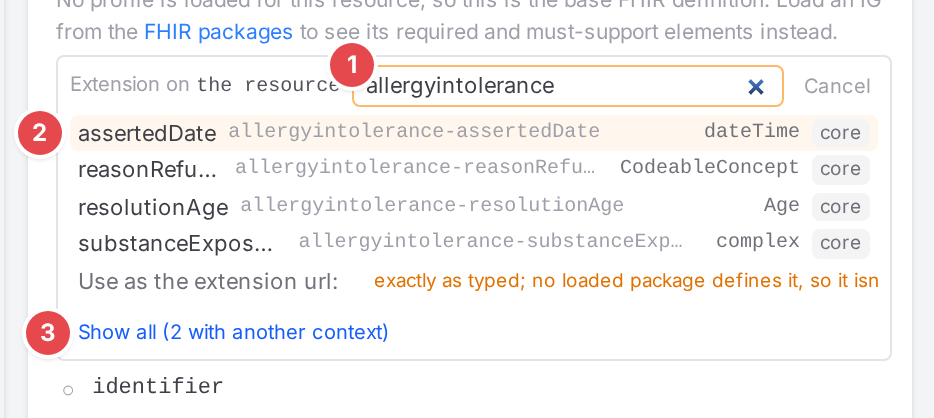
The picker for an extension on the resource.
1 Search extensions, or type any url…: filters by title, name or url. ↑ / ↓ move, Enter picks, Esc closes (or Cancel).
2 An extension: its title, the url’s tail, its value type (or complex) and the
package it comes from (core for the FHIR core extensions). Extensions already on the element are
greyed out and marked added.
3 Show all (N with another context): the list first shows the extensions whose context allows this element, and those whose context can’t be told (context?). This shows the others too, marked other context; Only fitting ones goes back.
To use an extension no loaded package defines, type its url: the picker offers Use as the
extension url:

A url of your own.
2. Pick it
Click the extension (or press Enter). The picker closes and the extension appears in the
profile’s list, with its value below it.
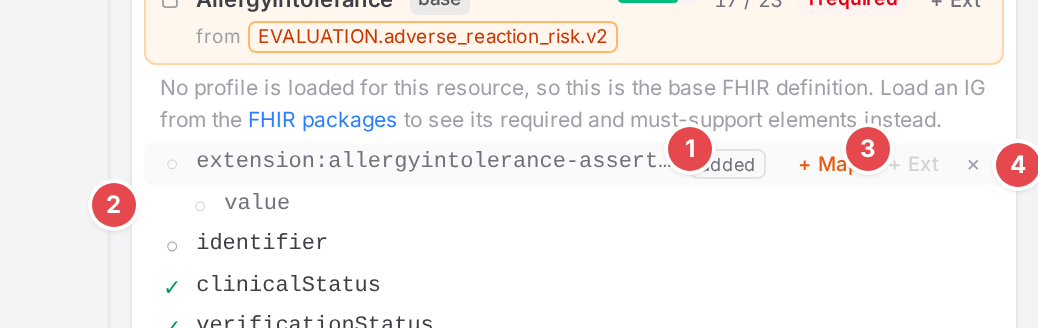
The added extension, not mapped yet.
1 added: not part of the profile. Hover it: “Not in the profile: added here, not mapped yet (kept for this browser session). Not counted.”
2 value: the extension’s value.
3 + Map: maps it (step 3).
4 × (“Remove the added extension”): drops it again.
Added extensions never count towards the profile’s coverage.
3. Map it with + Map
Hover the extension’s row and click + Map. Atlas adds a top-level mapping to the model, named after the extension, and selects it (see the screenshot at the top):
1 FHIR: $resource.extension (or the element’s extension).
2 openEHR: empty, with the cursor in it. Enter the openEHR path the value comes from (Write FHIR and openEHR paths).
3 FHIR condition: url is one of the extension’s url, so that reading FHIR
picks this extension and no other.
4 value: a child mapping from the extension’s value to $openehrRoot, the openEHR
node of the parent mapping. When the extension allows one value type, the path is narrowed to it
(value.as(DateTime)); with several, the cursor goes to the child’s FHIR path for you to narrow it.
A complex extension gets no value child.
5 url: a child mapping on $fhirRoot with a manual entry that writes the url.
If the model already maps that extension at the top level, + Map adds only the missing children to it (or selects it when nothing is missing).
Save the model. Once a mapping produces the extension, the row turns ✓ and stays listed, now from the mapping instead of the draft.
Check it worked
In the Profile tab, the extension’s row is ✓ and its added badge says “produced by a mapping”.
Convert openEHR to FHIR: the FHIR pane holds the extension with its
urland value.The Problems dock has no extension-url-not-written for the mapping.
Tips
Tip
On an element inside a slice, + Ext is disabled: “Inside the slice
Tip
A profile that closes its extension slicing on an element allows only its own extensions there; the picker says “The profile closes the extension slicing here: only its own extensions are allowed.”
Watch out
Warning
The extension’s condition (url is one of …) only selects the extension when reading FHIR. When the
engine builds FHIR from openEHR, it ignores the condition: the url is written only by the url
child mapping. Delete that child and the extension is built without its url; Atlas warns with
extension-url-not-written:

The warning after deleting the url child.
Warning
An extension you added but haven’t mapped is a draft kept for this browser session only. Map it (and save) before you close the session, or it is gone.
If something goes wrong
“The FHIR packages are still loading; try again in a moment.” Close the picker and open it again shortly.
“Could not load the extensions.” The profile couldn’t be read; check Use FHIR profiles and IG packages.
“No extension fits this element” / “No extension matches”: try Show all, or type the url.