Fixed values, codes and manual pairs
What you’ll do
You write values that aren’t in the source data, such as a fixed LOINC code or a document title, with manual pairs. You also limit a mapping to one direction, call a programmed mapping with a mapping code, and use the mappings of an extension model to add to, extend or replace the mappings of the model it extends.
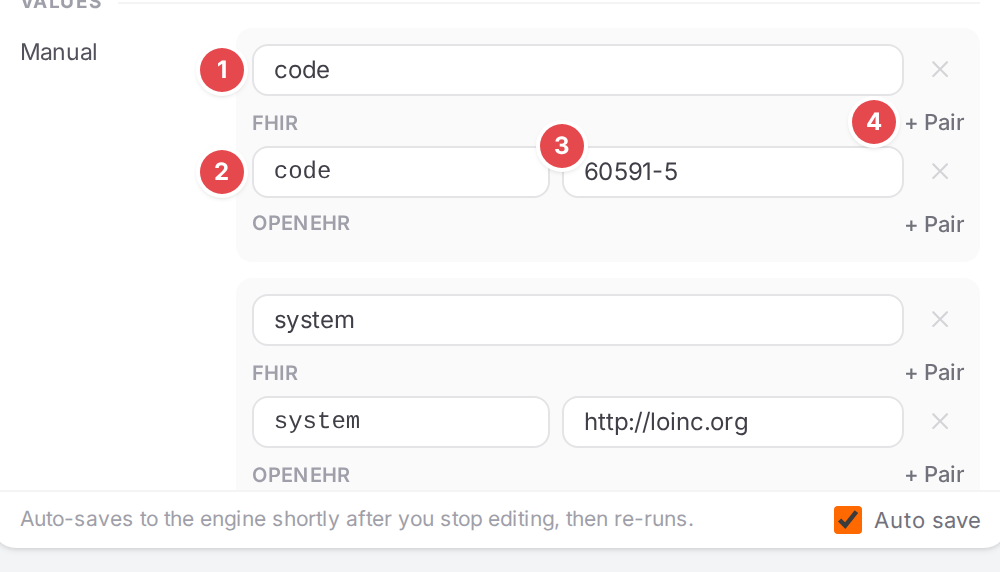
The type mapping of the IPS composition writes a fixed LOINC coding.
Before you start
Open the model and select the mapping (Edit mappings in the Workspace). Its paths say where the values go (Write FHIR and openEHR paths).
Steps
Write fixed values with manual pairs
Click + Property and pick Manual (under VALUES). A Manual entry appears in the Values group.
The entry’s name 1, a path 2 and its value 3, and + Pair 4.
Give the entry a name 1.
Under FHIR or openEHR, click + Pair 4 and fill in the path 2 and the value 3. Add as many pairs as you need; the × next to a pair removes it.
+ Add another adds a second entry to the same mapping; the × next to an entry’s name removes it.
How the pairs are read:
Paths are relative to the mapping. A FHIR path continues from the mapping’s own FHIR element: under
$resource.type.coding, the pathscode,systemanddisplaywritetype.coding.code,type.coding.systemandtype.coding.display.$fhirRootis the element itself. An openEHR path continues from the mapping’s own node;$openehrRootis the node itself. The path suggestions follow that.FHIR pairs are written when converting openEHR → FHIR; openEHR pairs when converting FHIR → openEHR. The engine turns each FHIR pair into a child mapping of its own.
openEHR pairs below an element take the attributes of its data value, by their RM name:
defining_code/code_string,defining_code/terminology_idandvalue/value(orvalue) for a coded text,magnitudeandunitsfor a quantity. The engine reads every spelling the same way, so the flat attribute (|magnitude,|unit) and strict AQL (value/magnitude) work too; see Paths and conditions cheat sheet.
Limit a mapping to one direction
Open the Advanced group at the bottom of the sheet (it is folded unless one of its properties is set) and click + Unidirectional, or pick Unidirectional from + Property.
Choose the direction the mapping runs in:
openehr->fhirorfhir->openehr. To make it run both ways again, click the × next to Unidirectional.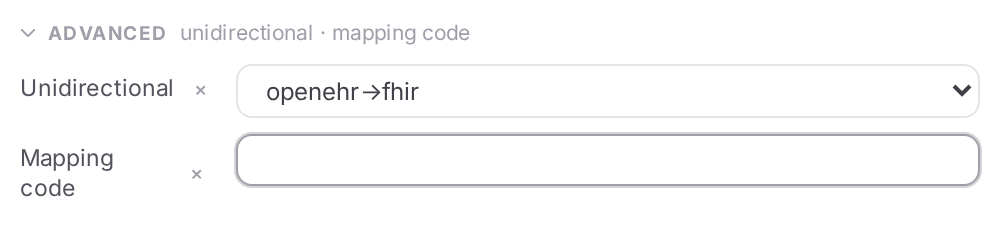
A mapping that runs only from openEHR to FHIR, with a mapping code being added.
Call a programmed mapping
In Advanced, click + Mapping code and type the function, for example
generateNarrative(entry). A mapping code calls one of the engine’s programmed mappings instead of copying values; see Programmed Mappings for the functions and their arguments.
Use an extension model’s mappings
An extension model (made with Extends in the wizard, Start mapping a template) changes the model it extends. On the overview it sits under that model, marked EXTENSION. Each of its mappings says in Advanced › Extension what it does to the extended model:
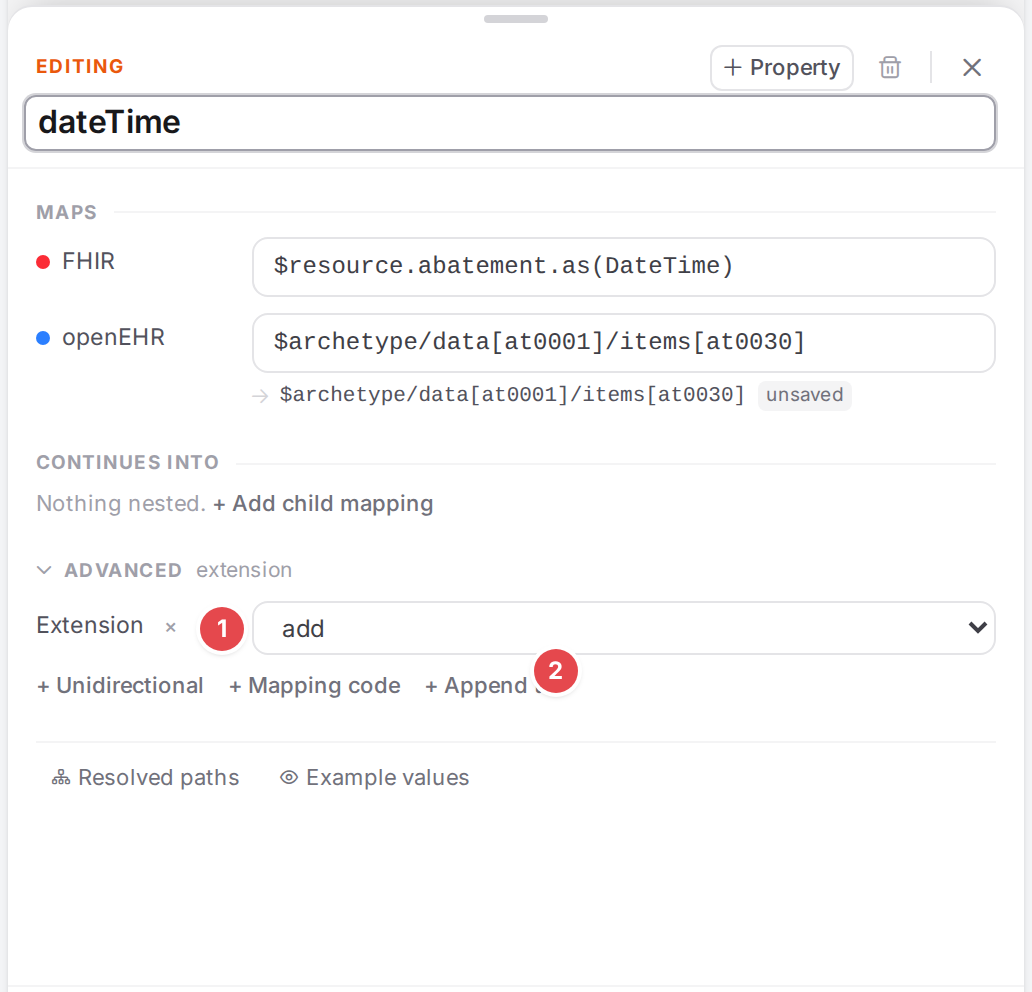
Extension 1 and + Append to 2 in an extension model’s mapping.
- add
The mapping is added to the extended model’s mappings.
- overwrite
The mapping replaces the extended model’s mapping of the same name.
- append
The mapping adds to the extended model’s mapping named in Append to 2: its conditions are set on that mapping and its child mappings are added after the existing ones. For a nested mapping, write the names joined by dots (
parent.child). Its own paths are not used.
Append to and Extension are offered only in extension models. A model-level terminology in the extension model replaces the extended model’s.
Check it worked
With an example loaded, the Example values tab of the mapping (See your mapping in action) and the FHIR pane show the fixed values in the converted resource.
Tips
Tip
Put pairs that build one element into one entry, with paths that share their start
(code.coding.code, code.coding.system): the engine creates the shared code.coding once, so
both values land on the same coding.
Tip
A fixed value that only exists on the FHIR side (a profile URL, a LOINC code, a status) is a manual
pair on a mapping whose openEHR path is the parent node, such as $composition or $archetype.
Tip
Set openehr->fhir on a mapping that only makes sense when building FHIR, such as a narrative or a
fixed coding, so it isn’t applied when reading FHIR.
Watch out
Warning
Extension mappings need a manual url writer when converting openEHR → FHIR. A FHIR extension
is addressed as extension plus a condition on its url. That condition selects the extension
when reading FHIR, but when building FHIR nothing writes the url unless a child mapping on
$fhirRoot has a manual FHIR pair url = the extension’s canonical. Without it you get
extension-url-not-written.
Add a FHIR extension builds both for you.
Warning
An append mapping’s own FHIR and openEHR paths are ignored by the engine. To change a mapping’s paths, use overwrite.
If something goes wrong
What you see |
What it means and what to do |
|---|---|
See Watch out. |
|
The mapping has neither a FHIR nor an openEHR path. A mapping with manual pairs still needs the path they continue from. |
|
terminology-conceptmap-missing / terminology-conceptmap-unknown |
A terminology on the mapping or model names no ConceptMap, or one that isn’t loaded. See Translate codes. |
Other notices are in Messages and notices A–Z.