Dedicated instances
Some capabilities need an openFHIR instance of your own: connecting the engine to your other systems, and running several isolated tenants. A shared environment, such as the sandbox or the public demo, can’t offer them. Atlas lists them under Dedicated instances in the sidebar, folded away and marked with a lock, so you can see what they are without them getting in your way.
Opening either page unfolds the group. Both pages carry the same notice, “Available on dedicated instances only”, and a Contact us button.
Integrations
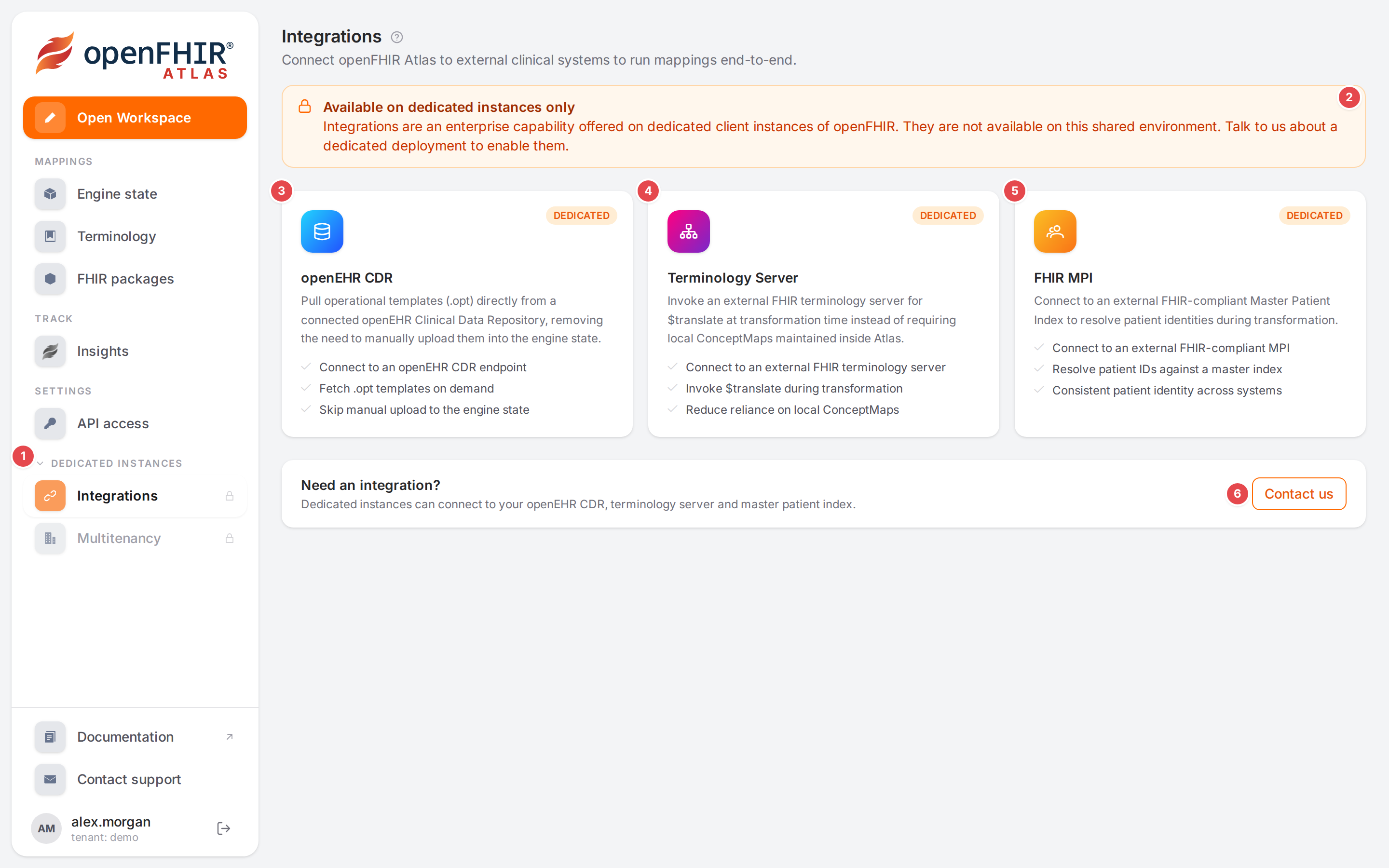
Integrations: “Connect openFHIR Atlas to external clinical systems to run mappings end-to-end.”
1 Dedicated instances in the sidebar holds Integrations and Multitenancy. Its count shows how many pages it holds while it is folded.
2 “Available on dedicated instances only”: integrations are offered on dedicated client instances of openFHIR, not on a shared environment.
3 openEHR CDR. The engine pulls operational templates (.opt) directly from your openEHR
Clinical Data Repository, so you don’t upload them to the engine state by hand: connect to an openEHR CDR
endpoint, fetch .opt templates on demand, skip manual upload. The CDR stays the only copy of each
template, so the two can’t drift apart. How it works on the engine, including the per-tenant choice of
CDR: Integrations.
4 Terminology Server. The engine calls an external FHIR terminology server for
$translate while it converts, instead of relying only on ConceptMaps kept in Atlas: connect to an
external FHIR terminology server, invoke $translate during transformation, reduce reliance on local
ConceptMaps. In a model’s terminology this is the external type with its Server. See
Integrations and Terminology.
5 FHIR MPI. Connect to an external FHIR-compliant Master Patient Index to resolve patient identities during transformation: resolve patient ids against a master index, for a consistent patient identity across systems.
Note
To confirm before release: the engine documentation doesn’t describe an MPI integration. Confirm that a dedicated instance offers it, or reword or remove this card here and on the Integrations page.
6 Contact us (“Need an integration?”) opens an e-mail to info@open-fhir.com with the subject “Dedicated instance — integrations”.
Multitenancy
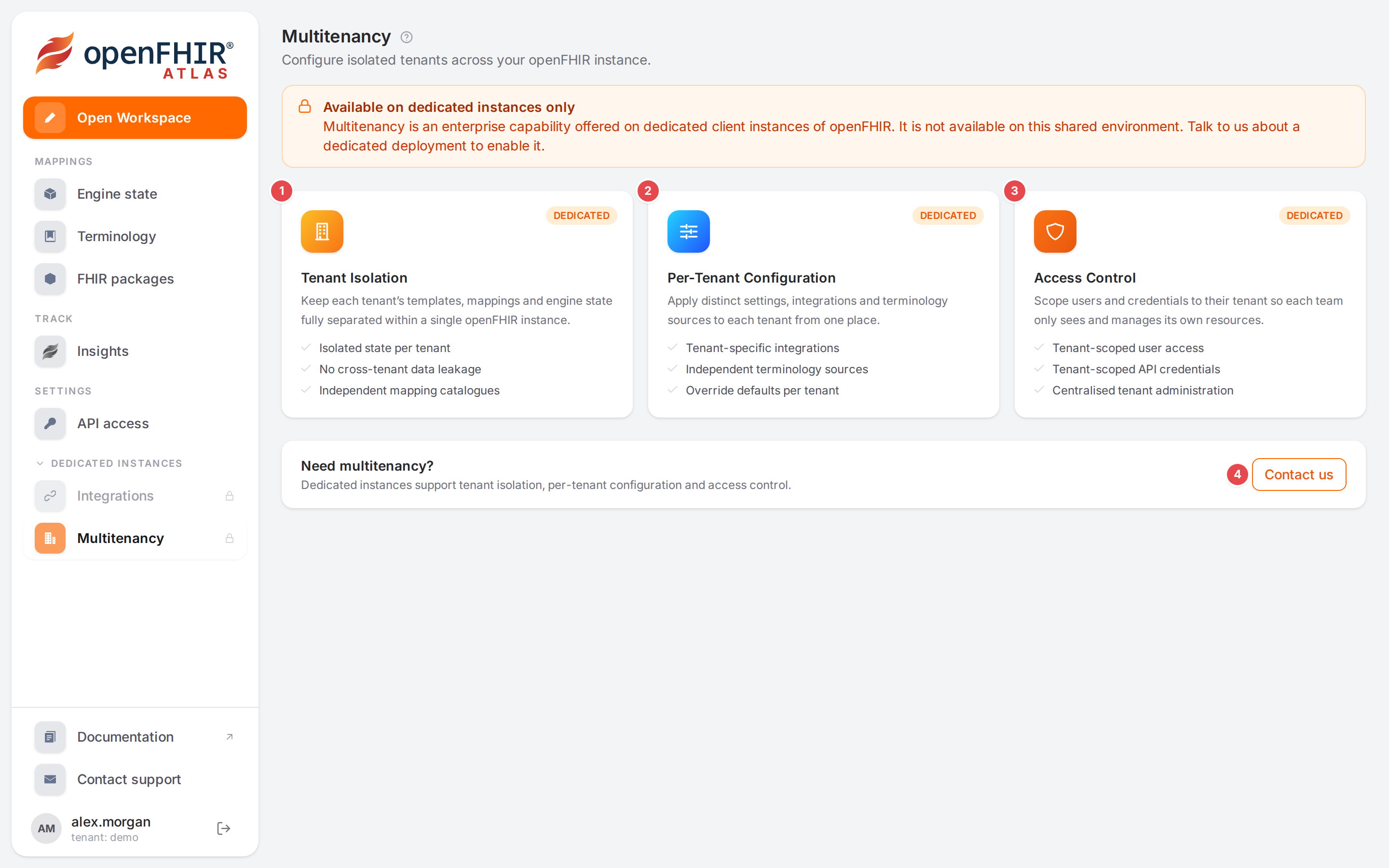
Multitenancy: “Configure isolated tenants across your openFHIR instance.”
One openFHIR instance can serve several organisations or teams, each in a tenant of its own. Every Atlas user already works inside one tenant (shown under the user name in the sidebar); a dedicated instance lets you run and configure several. The engine side is described in Multitenancy.
1 Tenant Isolation. Each tenant’s templates, mappings and engine state are kept fully separate within one instance: isolated state per tenant, no cross-tenant data leakage, independent mapping catalogues. On the engine this covers operational templates, context and model mappers, ConceptMaps and mapping insights.
2 Per-Tenant Configuration. Distinct settings, integrations and terminology sources per tenant, from one place: tenant-specific integrations, independent terminology sources, defaults overridden per tenant. The engine documents per-tenant settings such as how referenced resources are placed in a Bundle and which openEHR CDR a tenant’s templates come from.
Note
To confirm before release: the engine documentation lists no per-tenant terminology source (only per-tenant CDR and Bundle settings). Confirm that “Independent terminology sources” is offered, or reword this card here and on the Multitenancy page.
3 Access Control. Users and credentials belong to their tenant, so each team sees and manages only its own resources: tenant-scoped user access, tenant-scoped API credentials, centralised tenant administration. In Atlas, API access already lists only your tenant’s clients (Access and permissions).
4 Contact us (“Need multitenancy?”) opens an e-mail to info@open-fhir.com with the subject “Dedicated instance — multitenancy”.
Contact us
Write to info@open-fhir.com, or use the Contact us button on either page. Say which integrations you need (your CDR, terminology server, MPI) and how many tenants you plan to run.