Release a template
What you’ll do
You tag a release of one template, or of all mappings of the tenant: a Git tag with a version, release notes, and the coverage change since the previous release. Systems that load mappings from the repository can then pin that release, and you can export it, restore it or compare with it.
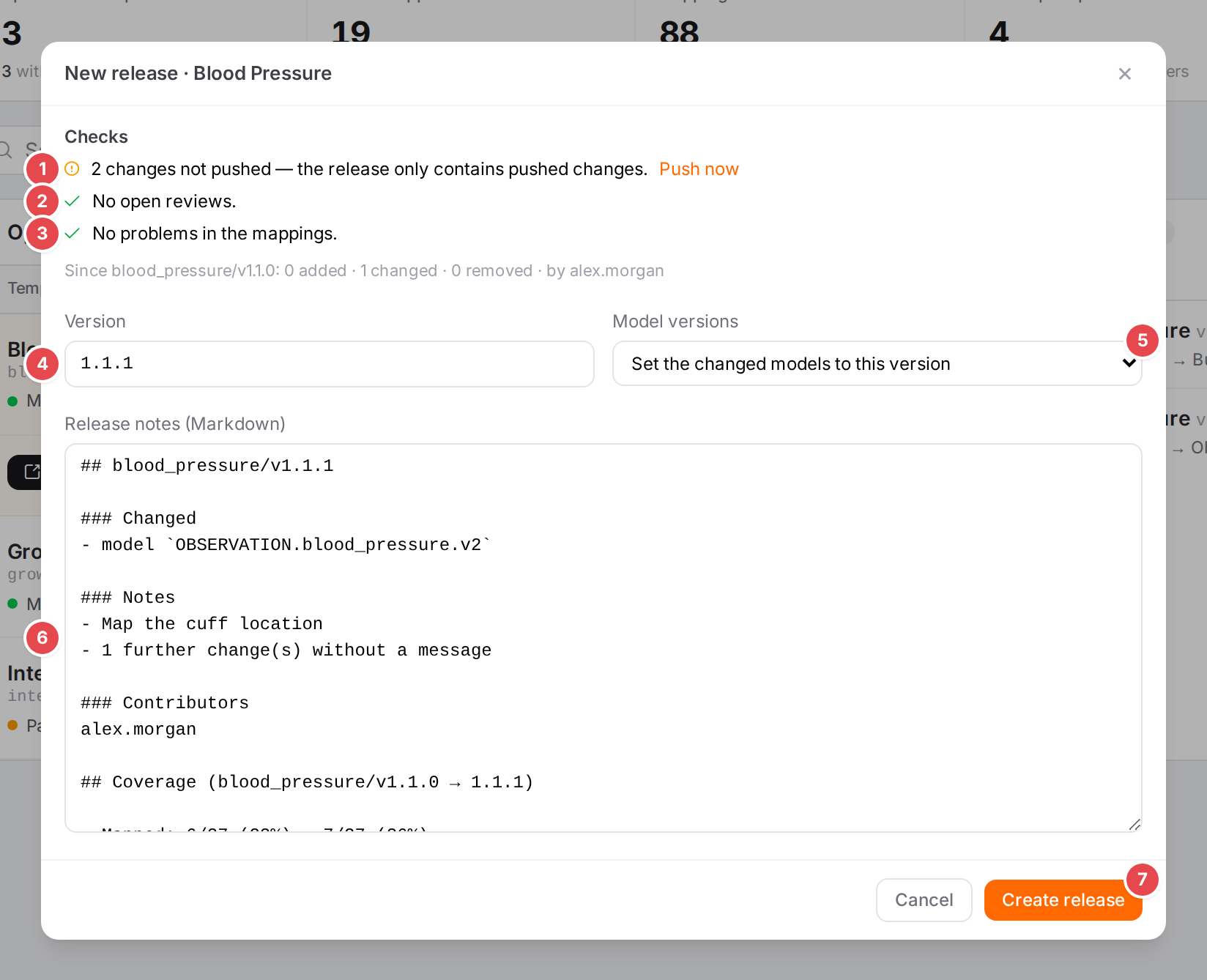
The release wizard for the Blood Pressure template.
Before you start
A Git repository is connected: see Connect a Git repository. Provider releases (a release page on GitHub, GitLab or Gitea) need a provider; without one, only the tag is created.
You need the
versioning.wscope. Set the changed models to this version and Increment the changed models’ versions also change the mappings, so they need write access to them.
Steps
Start the wizard:
for one template: on the Engine state page select the template, open ⋯ and choose Release… (under Versions);
or on the Releases tab of the Versioning page: pick the scope in the list (Whole tenant, or a template; All releases means the whole tenant) and click New release….
The title says what is released: New release · Blood Pressure, or New release · all mappings. Preparing the draft from the remote… shows while the engine prepares it.
Read the Checks:
Check
1
Unpushed changes
Everything is pushed., or N changes not pushed — the release only contains pushed changes. Click Push now to push them first.
2
Open reviews
No open reviews., or N open reviews — not part of this release.
3
Problems
No problems in the mappings., or N errors, N warnings in the mappings. (the problems of the saved mappings, as the Problems dock lists them; see Fix problems).
Below the checks: Since <previous release>: N added · N changed · N removed · by …, the people whose changes the release contains.
Check the Version 4. The engine suggests one from the changes since the previous release: a removed file raises the major version, an added one the minor, a changed one the patch. Any version like
1.2.0is accepted (a leadingvis dropped).Choose Model versions 5:
Leave as they are (default);
Set the changed models to this version: the
metadata.versionof each model and context changed since the previous release becomes the release version;Increment the changed models’ versions: each changed model’s own version goes up by the same level as the release (versions that aren’t like
1.2.0stay as they are).
Edit the Release notes (Markdown) 6. They start with the engine’s draft: the added, changed and removed files, the checkpoint messages, restores and contributors. When there is a previous release, Atlas appends a Coverage section (Computing the coverage change… while it works): mapped nodes and required unmapped nodes then and now, the changes, and the newly mapped and no longer mapped nodes.
Click Create release 7. Creating the release (tag, notes, provider release)… shows while it works.
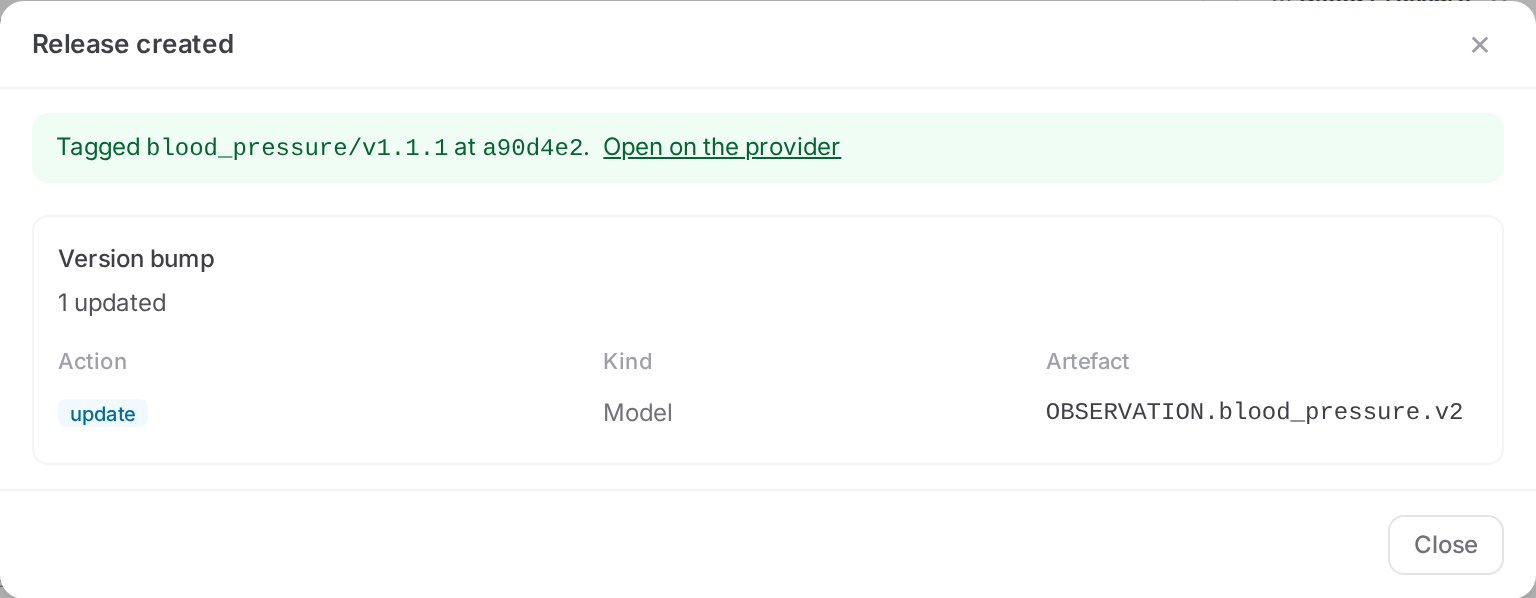
The release is tagged; the changed model got the release version.
The result says Tagged <tag> at <commit>. with Open on the provider, and, if you chose to change model versions, the Version bump it made. With the review workflow the version bump goes through a pull request instead: The release waits for its pull request to be merged; the tag <tag> is created then. Once it is merged, the review on the Reviews tab offers Create the tag <tag> (see Submit for review).
Tag names
Released |
Tag |
|---|---|
All mappings of the tenant |
|
One template |
the template’s key and the version, for example |
The Releases tab
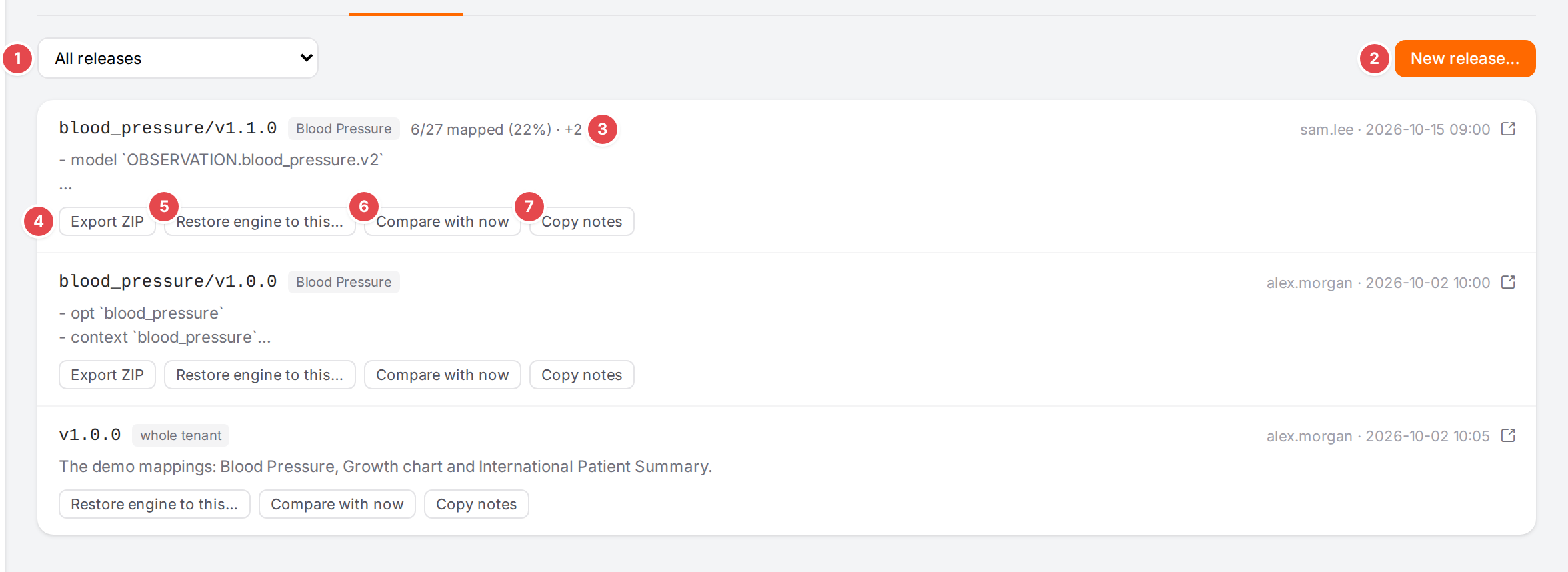
The releases of the demo mappings.
1 |
Which releases to list: All releases, Whole tenant, or one template. |
2 |
New release… for the scope picked in 1. |
3 |
The coverage stored with the release: mapped nodes of the template, and how many were newly mapped since the release before. |
4 |
Export ZIP: download the template as of this release (template releases only, see Export and move mappings). |
5 |
Restore engine to this…: bring the engine back to this release (see History, blame and restoring). |
6 |
Compare with now: open the Compare tab from this release to the engine (see Compare two versions). |
7 |
Copy notes copies the release notes; it reads Copied for a moment. |
The arrow icon opens the release on the provider.
Check it worked
The release is at the top of the Releases tab with its notes.
Open on the provider shows the tag (and, with a provider, its release page).
Tips
Tip
Check coverage before you release: the Coverage section in the notes tells readers what the release adds. See Find what isn’t mapped yet.
Tip
Releasing one template keeps its versions independent of the other templates of the tenant. Restoring or exporting a template release touches only that template.
Watch out
Warning
Changes not pushed and open reviews are not part of the release. Push them, or merge the reviews, before you create it.
Warning
A version that already exists as a tag can’t be released again. Pick the next version.
If something goes wrong
Message |
What to do |
|---|---|
A version like 1.2.0 |
The version isn’t valid; Create release stays disabled. |
Coverage unavailable (hover for the reason) |
The coverage change couldn’t be computed; the release still works, without that section. |
Could not prepare the release draft |
The engine couldn’t read the remote; check the Connect a Git repository page. |
Could not create the release, or the engine’s reason (for example that the tag exists already) |
Fix the cause and try again. |
No API base URL is stored for <provider>, so reviews and releases can’t reach it. |
Fix it on the Connect a Git repository page. |
See Messages and notices A–Z for the rest.