Submit for review
What you’ll do
With the review workflow, mapping changes reach the main branch only through pull requests (merge requests on GitLab). You submit your unpushed changes for review, follow the review in Atlas, and deal with the two cases where the engine and the branch end up different: a review closed without merging, and a merge that changed what you submitted.
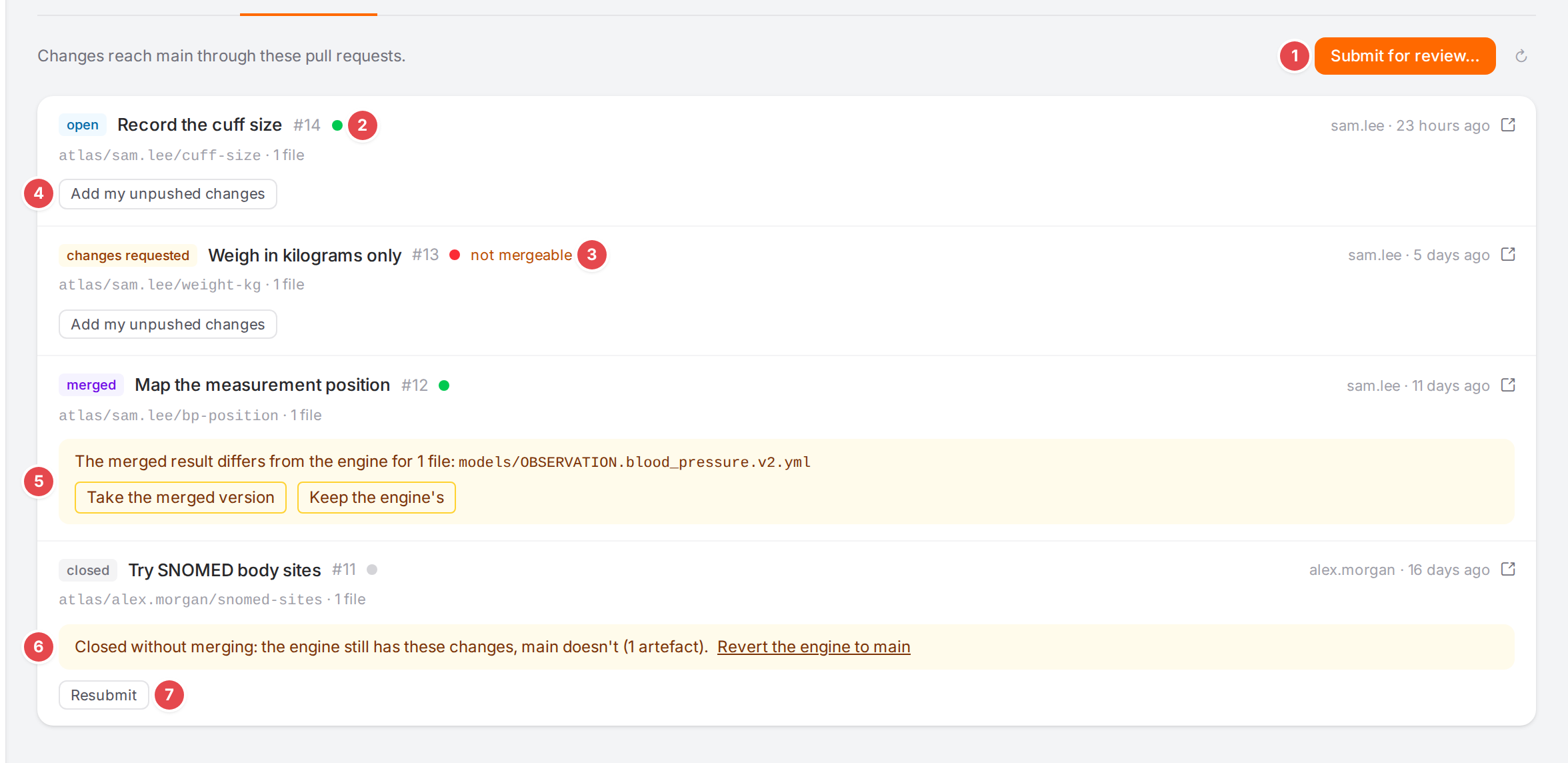
The Reviews tab of the Versioning page.
Before you start
A Git repository is connected with a provider (GitHub, GitLab or Gitea / Forgejo, not Plain git) and Workflow is Review — changes go through pull requests: see Connect a Git repository.
You need the
versioning.wscope.You have unpushed changes: the badge reads, for example, 2 unpushed or N in review.
Steps
Submit your changes
Open Versioning, then the Remote or Reviews tab, and click Submit for review…. (The History tab has the same button next to Checkpoint….)
Fill in the dialog:
1 Topic (the branch name)
A short name; the review branch is made from it, for example
cuff-location.2 Title
The title of the pull request.
3 Description
Starts as a list of the changes; edit it as you like (Markdown).
4 Changes to include
Every unpushed change that isn’t in a review yet, all ticked. Untick the ones that should wait.
5 checkpoint
This change carries a checkpoint message, which names the commit it closes. The others are named automatically.
Click Submit. Opening the pull request… shows while the engine creates the branch and the pull request. The dialog closes when it is done.
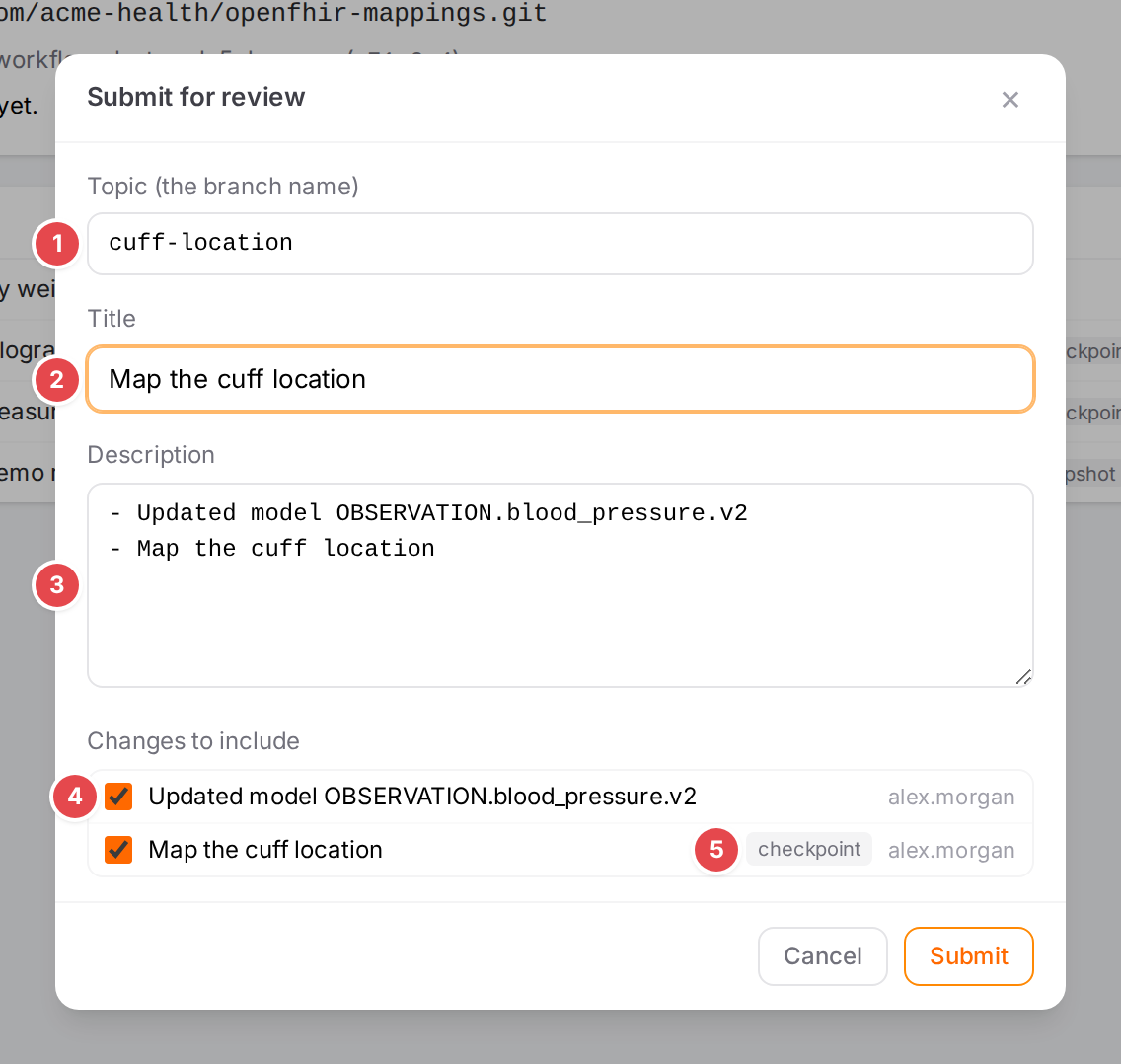
Submitting the cuff location changes for review.
Submit stays disabled until the topic and the title are filled in and at least one change is ticked.
Follow a review
Each review on the Reviews tab shows its state (open, approved, changes requested, merged, closed), its title and number, who opened it and when, the branch and the number of files. The arrow icon opens the pull request on the provider.
1 |
Submit for review… |
2 |
The checks of the pull request: a green dot passed, red failed, amber still running. Hover for the state. |
3 |
not mergeable: the provider can’t merge it as it is. Resolve it on the provider. |
4 |
Add my unpushed changes: put your newer unpushed changes into this review. |
5 |
The merged result differs from the engine (see below). |
6 |
Closed without merging (see below). |
7 |
Resubmit, on a pull request closed without merging: open a new pull request with the same changes. |
The engine reads the state of open reviews from the provider about once a minute; the round arrow reloads the list. In the history, the changes of an open review carry a chip with its state (in review, approved, changes requested); once merged, they count as pushed.
When the merged result differs from the engine
A squash or rebase merge, or an edit made in the pull request, can leave the branch with a text the engine doesn’t have. The review then says The merged result differs from the engine for N file: and lists the files. Choose:
Take the merged version: the engine takes the branch’s text.
Keep the engine’s: the engine’s text is queued again as an unpushed change, ready for a new review.
When a review was closed without merging
The engine still holds the changes, the branch doesn’t. The review says Closed without merging: the engine still has these changes, main doesn’t (N artefact). The history shows those changes with the chip review closed.
To drop the changes, click Revert the engine to main and confirm (Revert the engine to the branch? The changes of this review are undone in the engine.).
To try again, click Resubmit: the same changes go into a new pull request. The engine first checks the pull request with the provider; if it was reopened or merged meanwhile, it refuses and says so above the list.
Check it worked
The new review appears at the top of the Reviews tab as open.
The badge reads N in review, and the sidebar shows the number of open reviews next to Versioning.
The submitted changes no longer count as unpushed; in the history their dot turns blue.
Tips
Tip
Name your changes with a checkpoint before you submit (see History, blame and restoring): each checkpoint becomes a commit with its message, which makes the pull request easier to review.
Tip
A release made with the review workflow also goes through a pull request. Once it is merged, the review offers Create the tag <tag>. See Release a template.
Watch out
Warning
Take the merged version, and Revert the engine to main, change the mappings in the engine and reload the open model. Save your edits first.
Warning
With the review workflow nothing is pushed automatically, whatever Push automatically said before. Unsubmitted changes stay in the engine only.
If something goes wrong
Message |
What to do |
|---|---|
There are no unpushed changes. |
Nothing to submit: everything is pushed or already in a review. |
Could not submit the review, or the provider’s reason (for example a refused pull request) |
The dialog stays open with the reason. Check the token’s rights on the provider (see Connect a Git repository). |
The review action failed |
Adding, resubmitting, reconciling or reverting failed; the reason is shown above the list. |
Review <id> is open; only a review closed without merge can be resubmitted |
The pull request was reopened on the provider. Reload the list; add your changes to it instead. |
No API base URL is stored for <provider>, so reviews and releases can’t reach it. |
Fix it on the Connect a Git repository page. |
See Messages and notices A–Z for the rest.