Compare two versions
What you’ll do
You compare how much of a template was mapped in two versions (a release, a commit, a branch, or the engine now), see which template nodes became mapped or stopped being mapped, and read what changed in the models that did it.
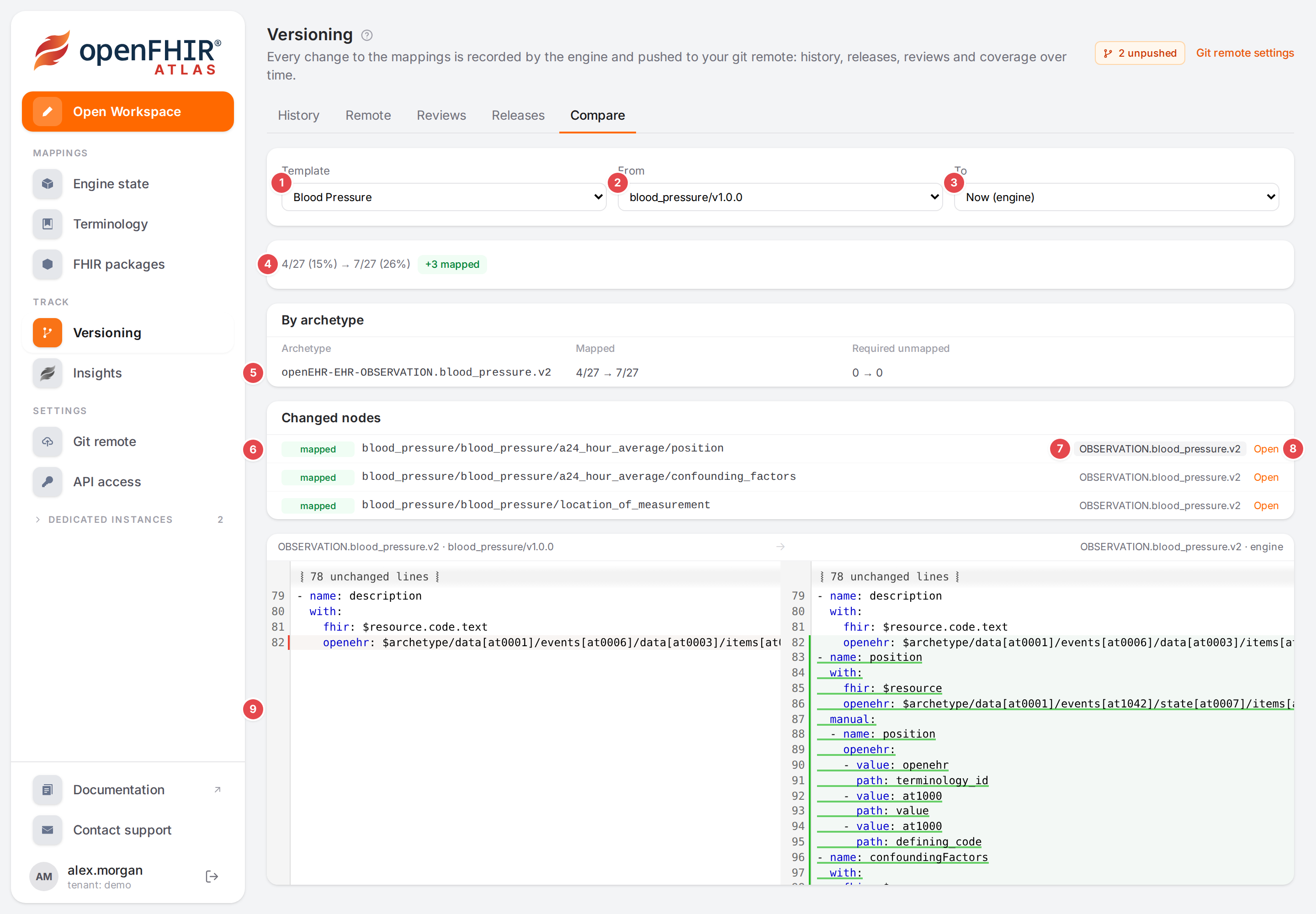
What was mapped in the Blood Pressure template since release blood_pressure/v1.0.0.
Before you start
A Git repository is connected: see Connect a Git repository. Versions are read from it.
Coverage is counted the same way as on the Template tab of the Workspace; Find what isn’t mapped yet explains how.
Steps
On the Compare tab
Open Versioning and click the Compare tab, or click Compare with now on a release of the Releases tab.
Pick the Template 1.
Pick From 2 and To 3. Each list offers Now (engine), the releases, the recent commits, and Other ref…, which opens a field for any branch, tag or commit. From starts at the newest release, To at Now (engine).
Reading both versions and computing their coverage… shows while Atlas works.
Read the result:
4
Mapped nodes then and now, with the share of the template (4/27 (15%) → 7/27 (26%)), and chips: +N mapped, −N lost, required unmapped a → b, not modelled a → b, N template nodes added or removed (when the OPT itself changed). No coverage changes. when nothing changed.
5
By archetype: mapped nodes and required unmapped nodes of each archetype, then → now.
6
Changed nodes: each changed node of the template with its change (mapped, lost, changed, new node, node gone) and required when the template requires it.
7
The model that maps the node. Click it to see what changed in that model between the two versions.
8
Open the template and that model in the Workspace.
9
The diff of the model: the From version on the left, the To version on the right.
The address of the page holds the template and both versions, so you can send it to someone (see Links you can share).
In the Workspace
Open the template in the Workspace and switch the openEHR pane to its Template tab.
Open Compare with… 1 and pick a release or one of the 20 newest commits.
A line under the filters 2 reads Since <version>: with the same chips as the Compare tab, and every changed element of the tree gets a coloured bar on its left: green newly mapped, red no longer mapped, blue changed, grey added to or removed from the template. Each archetype’s bar shows how many nodes it gained or lost (+3).
Click × 3 (Stop comparing) to go back to the plain view.
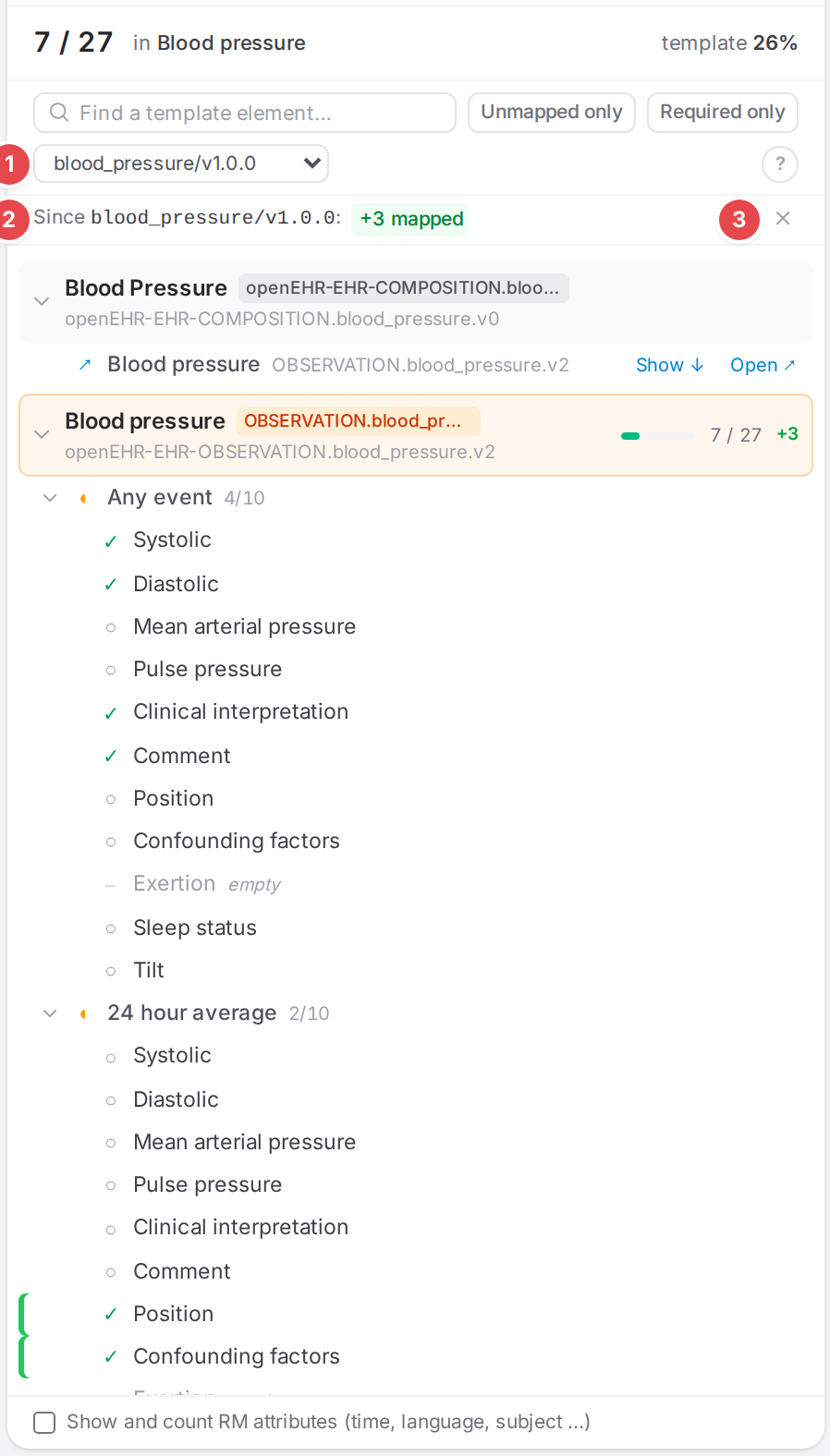
The Template tab compared with the first release: position and confounding factors are newly mapped.
Check it worked
The Compare tab’s summary and the Workspace’s Since … line show the same chips for the same two versions.
Tips
Tip
Before a release, compare the previous release with Now (engine): it is the coverage section the release notes will get (see Release a template).
Tip
Compare two commits around a problem to find the change that lost a mapping, then click the model to see the lines.
Watch out
Warning
Only the openEHR side is compared. FHIR profiles and IG packages aren’t versioned, so the Profile tab has no comparison.
Warning
Compare with… appears only when versioning is available and a Git repository is connected. It resets when you switch to another template, and is not remembered.
If something goes wrong
Message |
What to do |
|---|---|
Could not compute the coverage of both versions |
One of the versions couldn’t be read (a mistyped ref, or the template didn’t exist then). Pick another version. |
Could not read the template as of <version> (Workspace) |
The same, for the Workspace comparison. |
Could not load the changes of <model> |
The model’s diff couldn’t be read; the coverage result is still valid. |
See Messages and notices A–Z for the rest.