API access
API access (/api-access) is where you get credentials for calling the openFHIR engine from
your own system: API clients with their secrets, access tokens, and the engine’s REST API in
Swagger. Connecting a system step by step is in Connect your system to the API; the API itself is
described in RESTful APIs and Authentication.
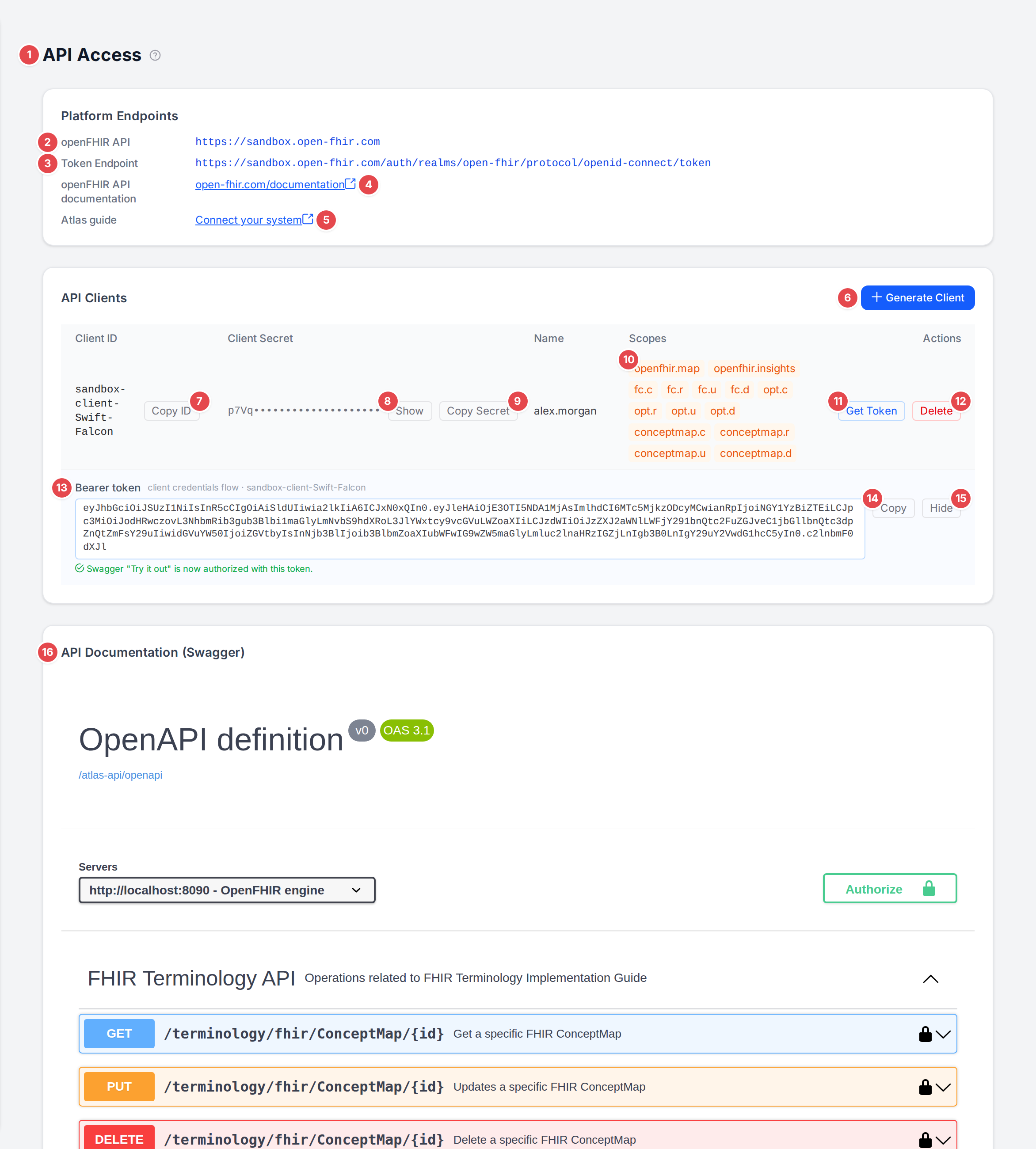
One API client with a freshly fetched access token.
- 1 API Access
The page title, with its help link.
- 2 openFHIR API
The address of the openFHIR engine your clients call.
- 3 Token Endpoint
Where a client exchanges its ID and secret for an access token (the OAuth 2 client credentials flow).
- 4 openFHIR API documentation
The engine’s documentation, in a new tab.
- 5 Connect your system
The Atlas guide Connect your system to the API, in a new tab.
- 6 Generate Client
Creates a new API client for your tenant. It gets the engine’s scopes for conversions, insights and reading and writing templates, models and ConceptMaps.
- 7 Copy ID
Copies the client ID (the button says Copied!).
- 8 Show / Hide
The secret is masked after its first four characters; Show reveals it.
- 9 Copy Secret
Copies the secret.
- 10 Scopes
What the client may do:
openfhir.*(convert, read insights),fc.*(FHIR Connect models and contexts),opt.*(templates) andconceptmap.*(ConceptMaps), each withc,r,uordfor create, read, update or delete. See Access and permissions.- 11 Get Token
Fetches an access token for the client with the client credentials flow. If that fails, the browser shows “Failed to obtain a bearer token for client “id”.”
- 12 Delete
Asks Delete client: “Permanently delete client “id”? This cannot be undone and its credentials will stop working immediately.”
- 13 Bearer token
The token, for the
Authorization: Bearer …header. Once Swagger has loaded, the token also authorises its Try it out: “Swagger “Try it out” is now authorized with this token.”- 14 Copy
Copies the token.
- 15 Hide
Hides the token row.
- 16 API Documentation (Swagger)
The engine’s OpenAPI description, loaded through Atlas. Expand an operation and use Try it out to call the engine; Authorize takes a token by hand. If the description can’t be loaded, the panel says “Could not load the API documentation from the openFHIR engine.”
With no clients yet, the table says No API clients found for your tenant.
Warning
The page lists every client of your tenant, so everyone who signs in to the tenant can read their secrets. Store a secret like a password, and delete a client you no longer use: its credentials stop working at once.