FHIR packages
FHIR packages (/fhir-packages) lists the Implementation Guide packages loaded for your tenant.
The Workspace uses their profiles for path suggestions, checks, coverage and validation. Core FHIR
(hl7.fhir.r4.core and the like) is built in and isn’t listed. The task, step by step, is in
Use FHIR profiles and IG packages.
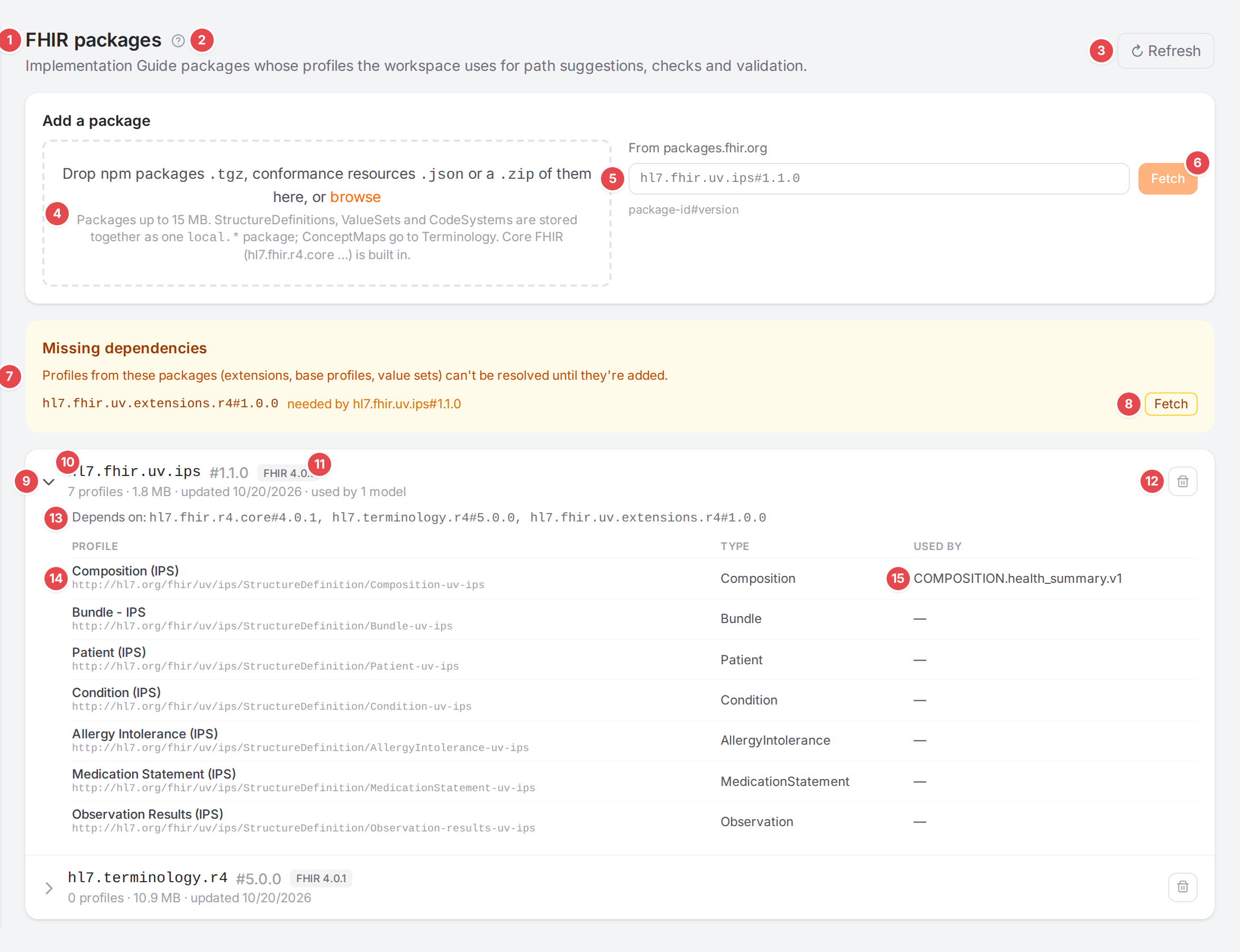
The IPS package and the HL7 terminology package, with one dependency missing.
- 1 FHIR packages
The page title.
- 2 Help
Opens this page.
- 3 Refresh
Reads the list from the engine again.
- 4 Drop zone
Drop npm packages
.tgz, conformance resources.json(StructureDefinition, ValueSet, CodeSystem, or Bundles of them) or a.zipof them here, or click browse; several at once. The files are listed with a cross to leave one out, a Package name for the loose resources when there is JSON or a ZIP, Cancel and Upload N files. Packages are stored as they are (up to 15 MB), the loose resources together as onelocal.*package, ConceptMaps on Terminology. After the upload the card says what was stored and which files were skipped.- 5 From packages.fhir.org
Type a package as
package-id#version, for examplehl7.fhir.uv.ips#1.1.0. Not offered when the engine has the package registry turned off.- 6 Fetch
Downloads that package from the registry. While it works, the panel says “Fetching package#version…” (or “Uploading file…”, “Uploading n files…”); a failure shows its reason below.
- 7 Missing dependencies
Packages that a loaded package depends on but that aren’t loaded: “Profiles from these packages (extensions, base profiles, value sets) can’t be resolved until they’re added.” Each line says which package needs it.
- 8 Fetch (missing dependency)
Fetches that dependency from the registry.
- 9 Expand
Shows the package’s dependencies and profiles.
- 10 Package
Its name and version. The line below gives the number of profiles, the size, when it was updated and how many models use its profiles (“used by 1 model”).
- 11 FHIR version
The FHIR version the package is built for.
- 12 Remove package
Asks Remove package: “Remove package#version? Models using its profiles fall back to base FHIR.”
- 13 Depends on
The packages this one needs.
- 14 Profile
The profile’s title and canonical URL, under Profile, and its Type (an extension definition says “(extension)”).
- 15 Used by
The models whose profile is this one: their structure definition, or the profile they write into
meta.profile.
A package the engine couldn’t load is flagged not loaded; point at the flag for the reason:

1 not loaded
With no packages, the list says:

The empty list.
Right after the engine starts, the page may say “The packages are still being loaded; their profiles appear shortly.” See Messages and notices A–Z.