Terminology
Terminology (/terminology) lists the FHIR ConceptMaps in the engine’s terminology store. Models
use them to translate coded values during a conversion. Here you upload, create, edit and delete
them. How a mapping uses a ConceptMap is in Translate codes; managing them
step by step is in Manage ConceptMaps.
The list
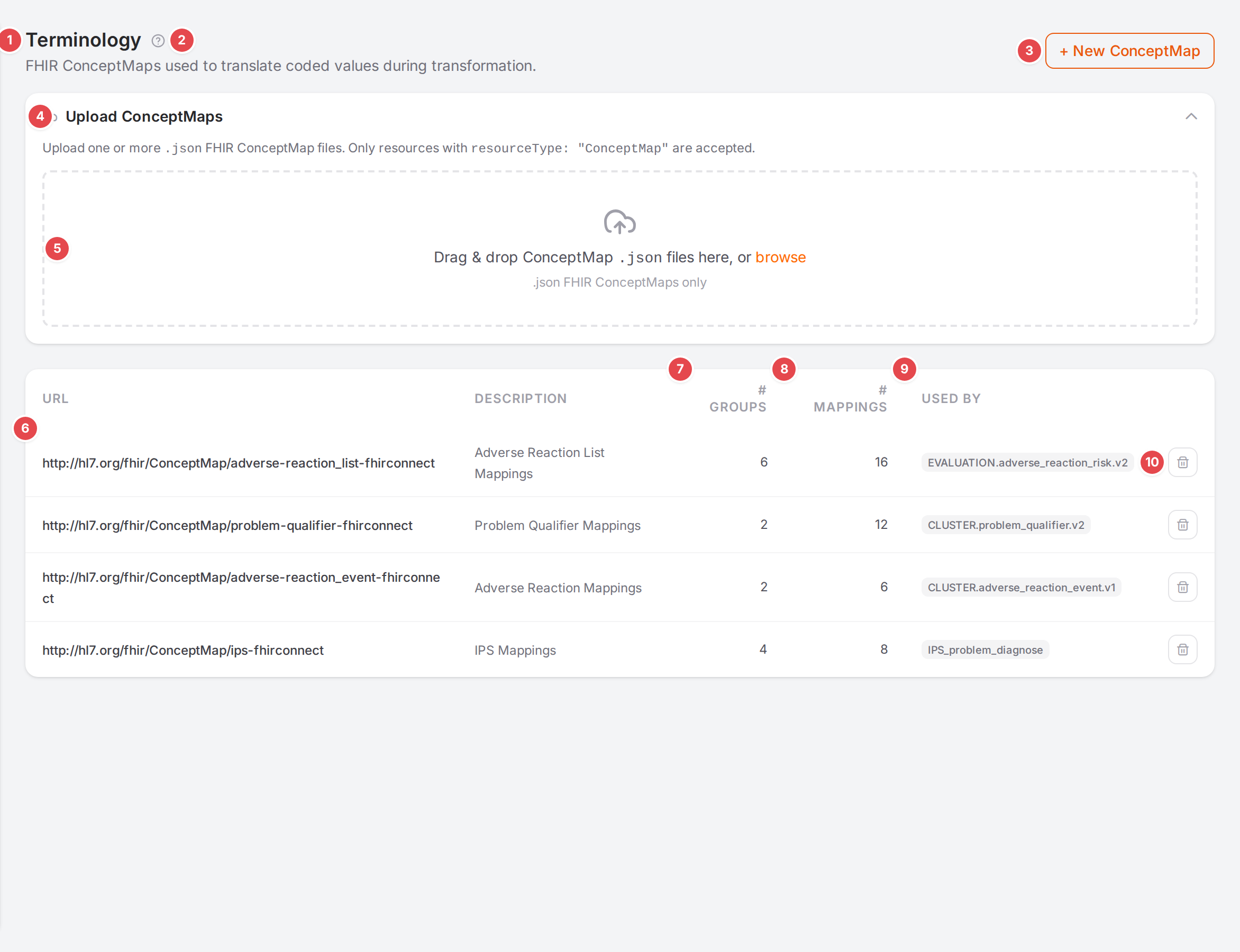
The ConceptMaps of the demo data, with Upload ConceptMaps open.
- 1 Terminology
The page title.
- 2 Help
Opens this page.
- 3 + New ConceptMap
Opens the editor on an empty ConceptMap.
- 4 Upload ConceptMaps
Opens and closes the upload panel. It stays open while an upload runs or has a result to show.
- 5 Drop zone
Drop one or more
.jsonFHIR ConceptMap files here, or click browse. Only resources withresourceType: "ConceptMap"are accepted; other files get Only .json FHIR ConceptMap files are accepted. The result lists each file with “N uploaded · N skipped · N failed” and Clear.- 6 URL
The ConceptMap’s canonical URL, followed by its Description. Click a row to open it in the editor.
- 7 # groups
How many groups (source system → target system pairs) it has.
- 8 # mappings
How many source codes it maps, over all groups.
- 9 Used by
The models whose terminology names this ConceptMap, or —.
- 10 Delete
Asks Delete this ConceptMap? (“This permanently removes the ConceptMap from the engine. This cannot be undone.”).
With no ConceptMaps, the page says No ConceptMaps yet. “Create one to map source codes to target codes for your mappings.”
A link of the form /terminology?conceptmap=<canonical URL> opens that ConceptMap’s editor
directly; the Workspace uses it to open the ConceptMap of a mapping. When no ConceptMap has that URL,
the page says “No ConceptMap found for url: url”. See Links you can share.
The editor
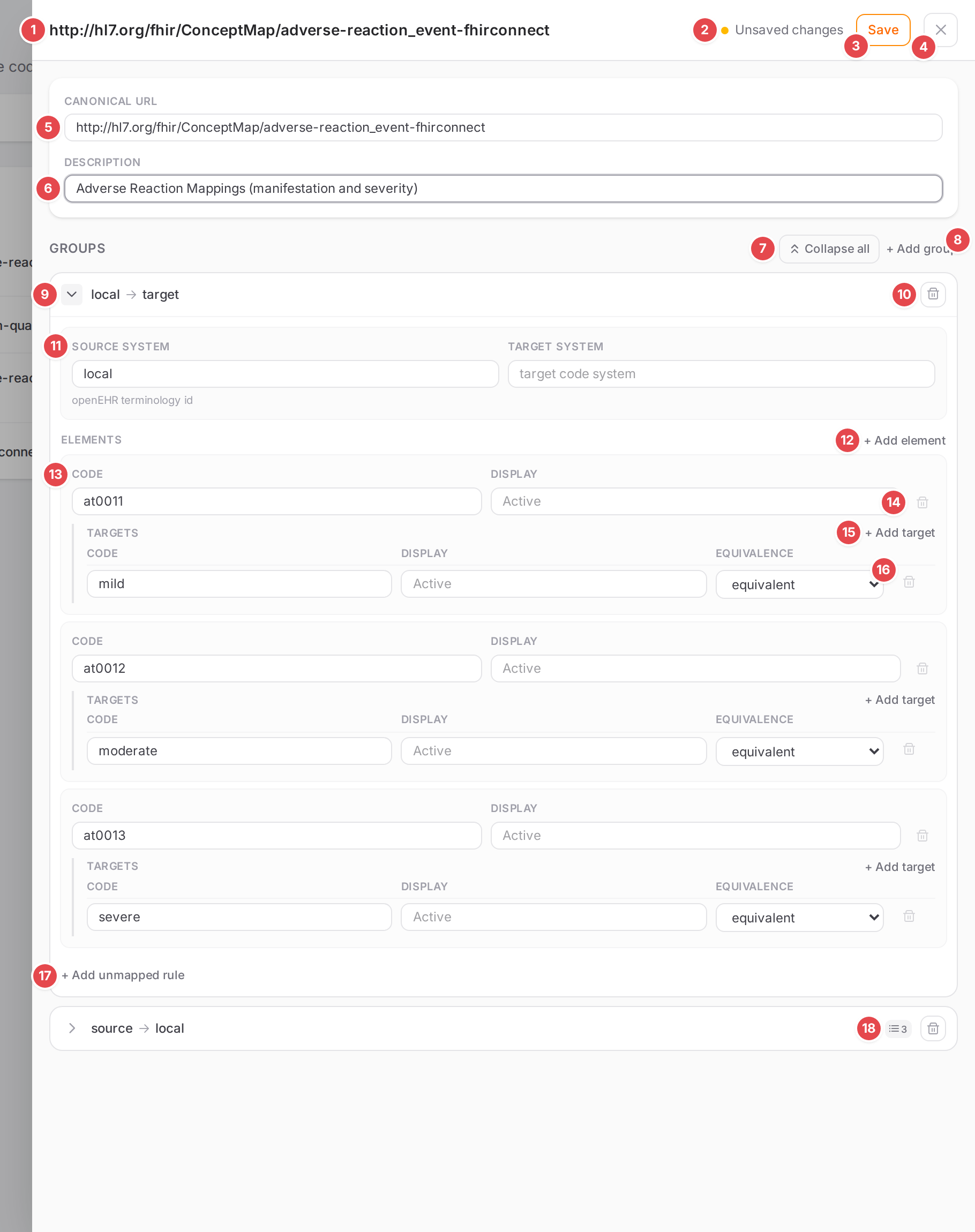
The adverse-reaction_event ConceptMap with an edited description.
- 1 Title
The ConceptMap’s canonical URL (New ConceptMap for a new one).
- 2 Save status
Unsaved changes, Saving…, Saved or Save failed. When a save fails, the reason shows in a red line under the header.
- 3 Save
Saves the ConceptMap to the engine. Enabled while there are unsaved changes.
- 4 Close
Closes the editor. With unsaved changes it asks Leave without saving? (“You have unsaved changes to this ConceptMap. If you leave now they will be lost. Leave anyway?”) with Leave and Keep editing. Clicking outside the panel does the same.
- 5 Canonical URL
The URL models refer to.
- 6 Description
What the ConceptMap translates.
- 7 Collapse all / Expand all
Folds or unfolds every group. Groups start folded when you open an existing ConceptMap.
- 8 + Add group
Adds a group, unfolded and ready to fill in. Without groups: “No groups yet. Add one to start mapping codes.”
- 9 Fold / unfold
Next to the group’s summary, “source → target”.
10 Remove group
- 11 Source system and Target system
The code systems the group maps from and to. Typing suggests the code systems of the loaded FHIR packages and of core FHIR (systems the ConceptMap already names first, badge
in use). The line below says where the system comes from and how many of its codes Atlas knows (“From package · 12 codes”, “FHIR core · 3 codes”), Packages still loading…, Not in any loaded package, or openEHR terminology id for a value such aslocal. See Suggested systems and codes.- 12 + Add element
Adds a source code.
- 13 Code and Display
The source code and its display text, suggested from the source system’s codes. Picking a code fills an empty display, picking a display fills an empty code.
14 Remove element
- 15 + Add target
Adds a target for the source code: Code, Display and Equivalence, each row with a remove button. Code and Display are suggested from the target system’s codes.
- 16 Equivalence
How the target relates to the source:
relatedto,equivalent,equal,wider,subsumes,narrower,specializes,inexact,unmatchedordisjoint.- 17 + Add unmapped rule
What happens to a source code the group doesn’t list: Mode (
provided,fixedorother-map), Code and Display (suggested from the target system), and forother-mapOther map: the ConceptMap to look the code up in, picked from the engine’s ConceptMaps.- 18 Element count
On a folded group: how many source codes it holds.